


Hard bounces vs. soft bounces
Not all bounces mean the same thing. The first question to answer whenever a message fails: is this permanent or temporary?
Hard bounces are permanent failures. The address doesn't exist, the domain doesn't exist, or the mailbox has been closed. SMTP status codes for hard bounces start with 5xx. Remove these addresses from your list immediately and do not retry. Continuing to send to hard-bounced addresses signals to mailbox providers that you're not managing your list, which accelerates reputation damage.
Soft bounces are temporary failures. The receiving server is down, the inbox is full, or your message was too large. Status codes start with 4xx. Your ESP will typically retry these automatically for 24 to 72 hours.
One important nuance: a soft bounce isn't always as temporary as it looks. A mailbox that's been full for weeks or months isn't a transient issue. It's almost certainly an abandoned account. Most ESPs treat persistent soft bounces as hard bounces after 3 to 5 consecutive failures across campaigns. Monitor addresses that soft-bounce repeatedly. If an address fails across two or three sends, treat it as a hard bounce and suppress it.
SMTP status codes worth knowing
Your ESP abstracts most of this, but understanding the underlying codes helps you diagnose problems faster and decide whether the fix is in your list, your authentication, or your content.
Hard bounce codes (5xx): 550 Requested action not taken: mailbox unavailable
The most common hard bounce. The address doesn't exist at this domain, or the recipient's server is rejecting mail from you specifically. Check whether this is isolated to one domain (a server-side block) or spread across many (a list quality problem).
551 User not local; please try forwarding
553 Requested action not taken: mailbox name not allowed
Both indicate address-level problems. The address format is invalid or the mailbox has been removed. Remove and do not retry.
554 Transaction failed
Often a DMARC or content-based rejection. If you're seeing a spike in 554s, check your authentication records first. A misconfigured SPF or DKIM record can cause a 554 even against a valid, active address.
Soft bounce codes (4xx): 421 Service not available, closing transmission channel
The receiving server is temporarily unavailable. Your ESP will retry automatically. No action needed unless the pattern persists across multiple sends.
452 Requested action not taken: insufficient system storage
The recipient's inbox is full. Retry once or twice. If it keeps failing, the mailbox is likely abandoned. After 3 to 5 retries across campaigns, suppress the address.
Annotated SMTP transcript: hard bounce
→ EHLO mail.yourdomain.com
← 250 Hello mail.yourdomain.com
→ MAIL FROM:<you@yourdomain.com>
← 250 OK
→ RCPT TO:<user@example.com>
← 550 5.1.1 The email account that you tried to reach does not exist.
^ Hard bounce. Remove this address now.
→ QUIT
← 221 Bye
Annotated SMTP transcript: soft bounce
→ EHLO mail.yourdomain.com
← 250 Hello mail.yourdomain.com
→ MAIL FROM:<you@yourdomain.com>
← 250 OK
→ RCPT TO:<user@example.com>
← 452 4.2.2 Mailbox full
^ Soft bounce. Retry in 24-72 hours.
→ QUIT
← 221 Bye
Decision tree: bounce code → action
| Code | Type | Action |
|---|---|---|
550, 551, 553 |
Hard | Remove immediately |
554 |
Hard | Check authentication, then remove |
421 |
Soft | Wait for ESP retry |
452 |
Soft | Retry 3–5 times; suppress if persistent |
Repeated 4xx across campaigns |
Treat as hard | Suppress |
Why bounces happen even when the address looks valid
A well-formatted address at a real domain can still bounce. Here's why.
Authentication failure
If your SPF, DKIM, or DMARC records are misconfigured, receiving servers may reject your mail at the SMTP level. You'll often see this as a 554 or a 550 with a reason like "Message rejected due to DMARC policy." Fix authentication first before diagnosing list quality.
Content filtering
Some bounces aren't about the address at all. The receiving server examined your message body and rejected it. Triggers include certain link patterns, attachments, or sending from an IP with a poor reputation. Check your bounce reason string: if it mentions "content," "spam," or "policy," the problem is in the message, not the list.
Reputation throttling
If your sending domain or IP has accumulated enough complaints, some mailbox providers will temp-fail your mail (4xx responses) as a soft rejection rather than delivering it. It looks like a soft bounce but won't resolve with retries. You'll need to address the underlying reputation problem.
Disposable and spam-trap addresses
These don't bounce in the classic sense. Disposable addresses (temporary inboxes created at signup, often abandoned within hours) and spam traps (addresses maintained by anti-spam organizations or recovered from old breached datasets) accept your mail silently. The damage shows up later: lower engagement rates, higher spam complaint rates, and deliverability degradation that's harder to trace than a bounce.
How to prevent bounces before they happen
Reactive bounce management keeps your list clean. Proactive validation keeps it from getting dirty in the first place.
Validate before you send
An SMTP-level check at the point of signup catches the majority of invalid addresses before they ever receive a message. Abstract's Email Validation verifies addresses against 8M+ known disposable domains, checks SMTP deliverability in real time, and flags role-based addresses (like info@ or noreply@) that rarely convert. Under 200ms, so there's no friction at signup.
Hard bounces cost reputation. Validation costs fractions of a cent per check. The math isn't close.
- Validate addresses before they bounce. Try Email Validation for free.
Set up authentication first
SPF, DKIM, and DMARC tell receiving servers that you are who you say you are. A bounce caused by authentication failure is entirely preventable. If you haven't configured all three, do that before anything else.
Run re-engagement campaigns
Email addresses go stale. People change jobs, abandon inboxes, or lose interest. Periodically send a re-engagement email to your least-active segments: something short, with a clear "stay subscribed" action. Suppress anyone who doesn't engage. Removing inactive addresses before they become hard bounces protects your reputation and reduces your list costs.
Watch your rate
Most ESPs start flagging accounts at a 5% total bounce rate and will suspend at 8–10%. SendGrid recommends keeping hard bounces (which they call "Invalid Address" rejections) below 5% of attempted messages. AWS SES will suspend your account automatically, without warning, if your bounce rate exceeds 10%. Don't wait for a platform notification to start paying attention. Set your own internal threshold at 2% and investigate anything above it.
Read the code, then fix the cause
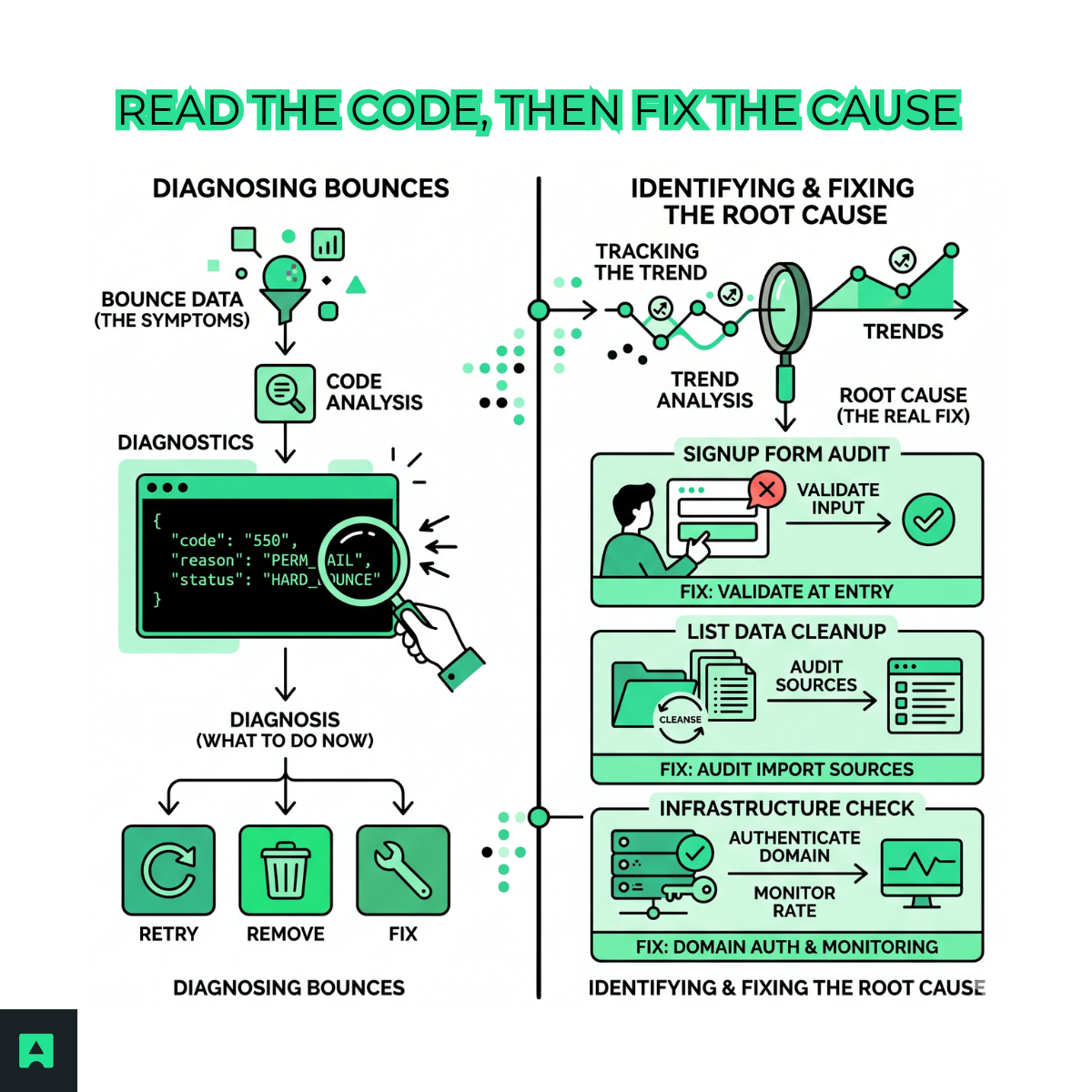
A bounce is a diagnostic message. The code tells you whether to retry, remove, or fix your infrastructure. The trend tells you something more important: where the bad addresses are coming from.
If you're seeing a spike in hard bounces after a particular campaign or list import, the fix isn't just removing the bounced addresses. It's auditing the source. A signup form that doesn't validate on input, an old import file, a purchased list: these are the root causes. Every hard bounce you got today represents dozens of similar addresses in the same batch that haven't bounced yet.
Validate addresses on collection, authenticate at the domain level, and monitor your bounce rate by source. That combination cuts your bounce rate without touching your campaign strategy.
