


The cryptographic handshake: how DKIM uses asymmetric encryption
The private key and public key relationship
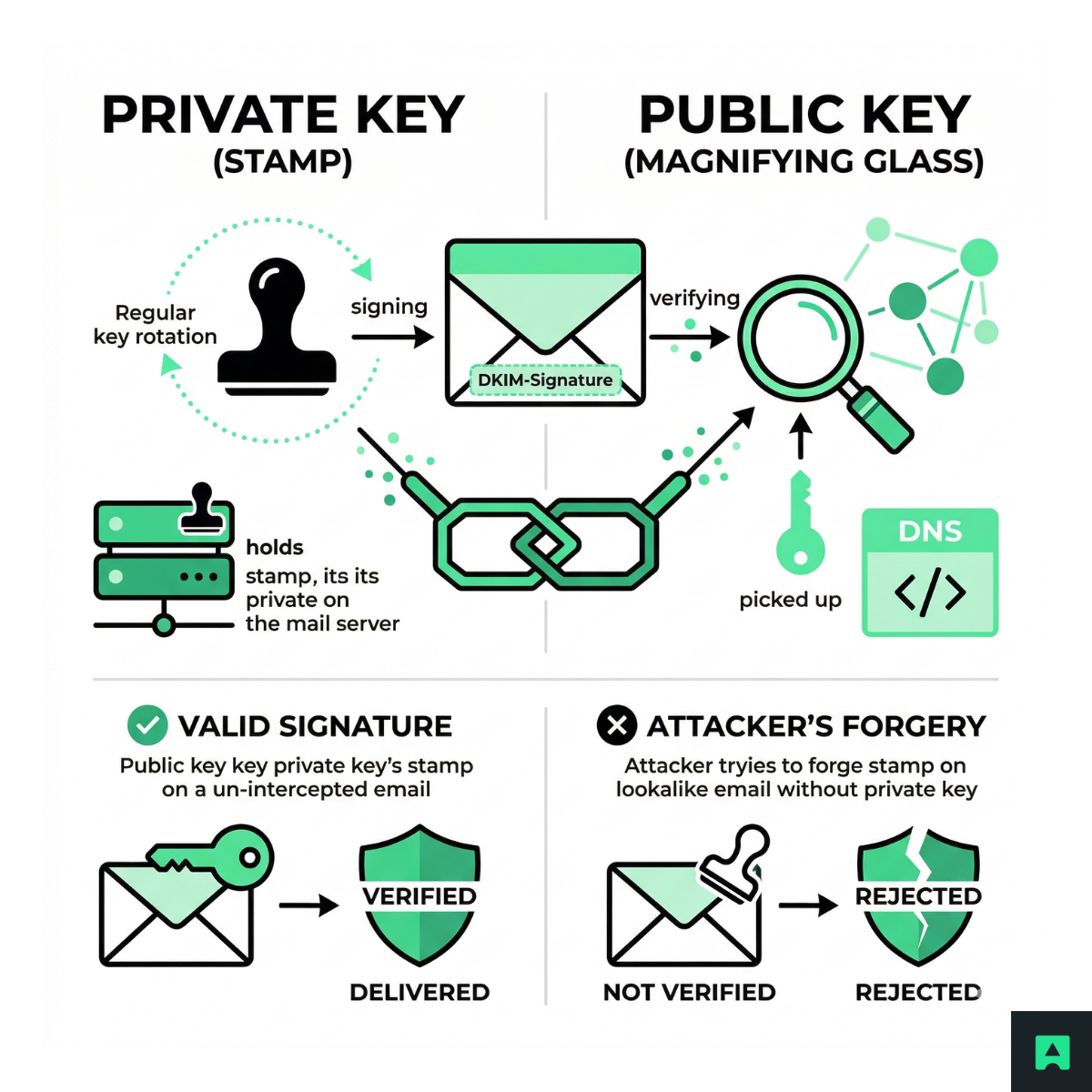
DKIM is built on asymmetric encryption, the same mathematical foundation behind HTTPS and SSH. You generate a key pair: a private key and a public key. They are mathematically linked — a message signed with one can only be verified by the other.
Here's the analogy that makes it click:
The private key is the stamp. Only your mail server holds it. It's used to cryptographically sign outgoing messages. You never share it, never publish it, and rotate it regularly.
The public key is the magnifying glass. It's published openly in your DNS so any recipient server in the world can pick it up and use it to verify the stamp.
An attacker cannot forge a valid DKIM signature without your private key. Even if they intercept your email, copy the headers, and send a lookalike, the math doesn't work — the signature won't verify against the public key in your DNS.
The DNS anchor: publishing your public key
Your public key lives in a DNS TXT record. This is what anchors trust to your domain's identity. If you control the domain, you control the DNS, and therefore you're the authoritative source for what a valid signature looks like.
A typical DKIM public key DNS record looks like this:
v=DKIM1; k=rsa; p=MIIBIjANBgkqhkiG9w0BAQEFAAOCAQ8AMIIBCgKCAQEA...
The v= field declares the DKIM version, k=rsa specifies the key algorithm, and p= is the base64-encoded public key itself.
If you're generating a new DKIM key pair, use 2048-bit RSA rather than the older 1024-bit standard. The 1024-bit key length is now considered weak by modern cryptographic standards and is actively deprecated by major mailbox providers — many will downgrade your reputation or fail to verify signatures using it.
The DKIM selector: managing multiple keys on one domain
A domain can publish multiple DKIM keys simultaneously — one for your marketing automation platform, one for your transactional email service, one for your internal HR tooling. The selector tells the recipient server which key to use.
The selector is specified in the s= tag of the DKIM-Signature header. The public key is stored at a DNS record following this naming pattern:
{selector}._domainkey.{domain}
So if your selector is marketing and your domain is example.com, the public key lives at:
marketing._domainkey.example.com
Your marketing automation tool uses s=marketing. Your transactional platform uses s=transactional. If you rotate keys — which you should do periodically — you can publish the new key at a new selector name, update your sending service to start signing with the new private key, wait for DNS to propagate globally, and only then retire the old selector. No downtime, no broken deliverability.
The DKIM signature lifecycle
Step 1: Canonicalization (the normalization phase)
Before hashing, the email is normalized. This process — called canonicalization — ensures small changes don't break verification:
- Extra spaces are removed
- Line endings are standardized
- Header formatting is normalized
Without this step, trivial formatting changes during transit would invalidate every signature.
Step 2: Hashing the message
The sending server generates a hash using a cryptographic algorithm (usually SHA-256). This hash is created from the email body and selected headers (like From, To, Subject). The result is a fixed-length string — this becomes the bh= value.
Step 3: Signing with the private key
The server signs the hash using its private key. This produces the DKIM signature, stored in the b= field. At this point, your email includes a header like:
DKIM-Signature: v=1; a=rsa-sha256; c=relaxed/relaxed;
d=example.com; s=selector1;
bh=abc123...;
b=xyz456…
Step 4: The recipient's verification process
When the receiving server gets the email, it performs the following steps:
- Reads the d= (signing domain) and s= (selector) tags from the DKIM-Signature header
- Constructs the DNS lookup path:
{selector}._domainkey.{domain} - Fetches the public key from that TXT record
- Uses the public key to decrypt the b= value — this reveals the original hash (Hash A)
- Runs the same canonicalization and hashing process on the received email to generate its own hash (Hash B)
- Compares Hash A and Hash B
If the hashes match, DKIM passes. If they differ, DKIM fails.
This is the core of how DKIM works: a hash comparison that proves integrity and authenticity.
Anatomy of a real DKIM-Signature header
Here's what a real DKIM-Signature header looks like pulled from an email's raw source:
DKIM-Signature: v=1; a=rsa-sha256; c=relaxed/relaxed;
d=example.com; s=mail2024;
h=from:to:subject:date:message-id:content-type;
bh=47DEQpj8HBSa+/TImW+5JCeuQeRkm5NMpJWZG3hSuFU=;
b=ABC123...base64encodedSignature...XYZ789
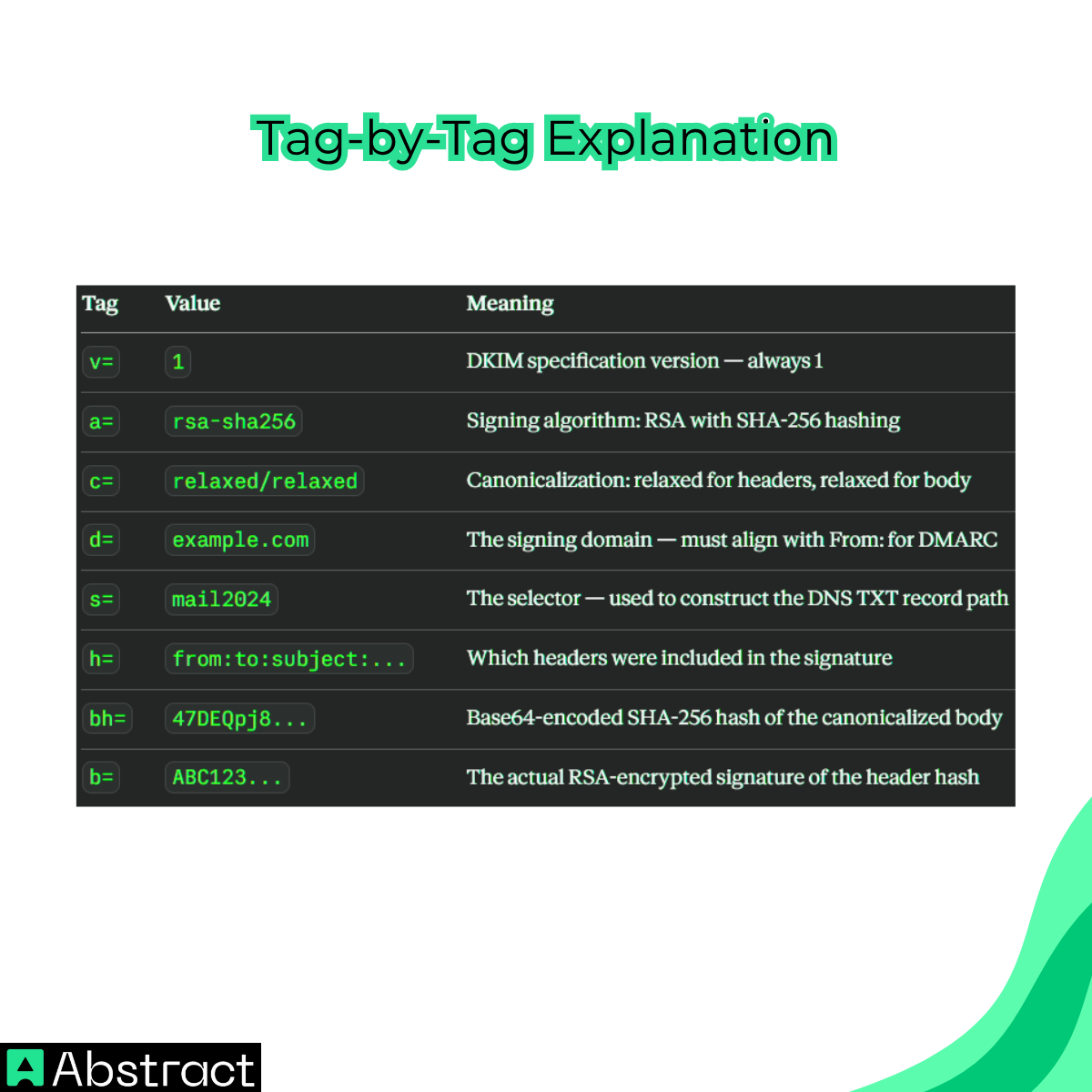
Every field tells a story — and when you're debugging a DKIM failure, this header is your starting point:
| Tag | Value (example) | Meaning | Debug relevance |
|---|---|---|---|
v= |
1 |
DKIM version | Should always be 1 |
a= |
rsa-sha256 |
Signing algorithm | Verify your setup supports this algorithm |
c= |
relaxed/relaxed |
Canonicalization method for header/body | relaxed is more forgiving of transit changes |
d= |
example.com |
Signing domain | Must align with your From: domain for DMARC |
s= |
mail2024 |
Selector | Confirm this selector exists in your DNS |
h= |
from:to:subject |
Headers included in signature | Missing a required header here causes failures |
bh= |
47DEQpj... |
Hash of the email body | Changes if body was modified in transit |
b= |
ABC123... |
The DKIM signature itself | Decrypted with public key to verify integrity |
When debugging: check d= against your From: domain (alignment), check s= against your actual DNS records (does that selector exist?), and verify the algorithm in a= is supported by your setup.
Why DKIM breaks in production
Even correctly configured DKIM setups fail in production. Here's why.
The forwarding problem
DKIM signs the exact content of the email. If a forwarding service modifies the message — adding a footer like "Unsubscribe here: ..." — the body changes, the hash changes, and DKIM fails.
This is common with mailing lists, legacy relays, and email gateways that append disclaimers. The solution is not to disable DKIM — it's to understand that forwarding pipelines that modify message content will break signatures by design, and to account for that in your DMARC policy.
DKIM and DMARC alignment failures
DKIM can pass and DMARC can still fail. This is one of the most common sources of confusion in email authentication.
DMARC checks alignment between the From: header domain and the d= signing domain. If those don't match, the DKIM result is technically valid but DMARC rejects it. This catches teams who configure each protocol in isolation — DKIM passes because the signature is mathematically correct, but DMARC fails because the signing domain doesn't match what the recipient sees in the From: field.
DNS propagation and key rotation
Key rotation is a security best practice. But rotating DKIM keys without respecting DNS propagation windows is a reliable way to break deliverability globally.
The workflow that avoids this:
- Generate a new key pair
- Publish the new public key in DNS under a new selector name (e.g., mail2025)
- Wait for DNS TTL to expire globally — minimum 24-48 hours, or however long your current TTL is set for that record
- Update your mail infrastructure to sign with the new private key using the new selector
- Verify delivery is working and signatures are passing
- Only then remove the old selector's DNS record
SPF vs DKIM vs DMARC: the deliverability triad
Email authentication isn't a single mechanism — it's a layered system. Each protocol covers a different attack surface.
| Protocol | What it verifies | How it works | What it protects | Mental model |
|---|---|---|---|---|
| SPF | Sender legitimacy (IP-level) | Checks if the sending server's IP is authorized in the domain's DNS SPF record | Prevents unauthorized servers from sending emails on your behalf | The guest list |
| DKIM | Message integrity and domain authenticity | Uses a public-private key pair to sign email content and verify it hasn't been altered | Prevents tampering and proves domain ownership | The wax seal |
| DMARC | Policy enforcement and alignment | Combines SPF and DKIM results and enforces rules (none, quarantine, reject) based on alignment | Protects your domain from spoofing and defines enforcement actions | The rulebook |
If one layer is missing, protection is incomplete. SPF alone breaks on forwarding. DKIM alone doesn't enforce policy. DMARC without alignment doesn't protect your visible domain. All three work together — each one covering what the others can't.
Where Abstract fits in
DKIM ensures your infrastructure is trustworthy. It doesn't guarantee your emails are deliverable.
Even fully authenticated emails fail if your list contains invalid addresses, disposable emails, typos, or addresses that hard-bounce. Abstract's Email Validation API lets you verify emails at the point of entry — before a single message is sent.
DKIM proves the message is authentic. Abstract's Email Validation confirms the address at the other end is real.
For a deeper breakdown of how validation improves deliverability end-to-end, see the email validation guide. If you're building this into production systems at scale, it's also worth understanding how API rate limits affect validation workflows under load.
Conclusion
Email spoofing is not a technical failure — it's a social one. Attackers exploit the gap between what an email looks like it says and what the underlying protocol can actually verify. DKIM closes that gap by making authenticity mathematically provable rather than visually assumed.
To recap: DKIM uses asymmetric encryption to sign outgoing emails with a private key and publishes the corresponding public key in DNS. Recipients verify the signature by fetching that public key and confirming the body hash hasn't changed. Selectors allow multiple keys on a single domain. Canonicalization handles benign transit changes. Alignment with DMARC is what makes the whole system enforceable — not just advisory. For a side-by-side breakdown of how DKIM and DMARC divide responsibilities, see DKIM vs DMARC: What Each One Does and Why You Need Both.
The biggest DKIM failures in production — forwarding breakage, alignment mismatches, premature key rotation — happen when DKIM is treated as a checkbox rather than a system. Understanding the mechanism is what makes the difference between configuration that passes a test and configuration that holds up in production.
DKIM is what makes your domain's identity mathematically verifiable. Pair it with clean list hygiene and you reduce both spoofing risk and bounce risk simultaneously — two of the most common reasons legitimate email doesn't reach the inbox. DKIM gives you the signature. DMARC is what makes it actionable — and setting it up in the wrong order is how teams accidentally block their own mail. How to set up DMARC step by step covers the full sequence, including how to read your first aggregate report.
Frequently Asked Questions
What is DKIM and what problem does it solve?
DKIM (DomainKeys Identified Mail) is an email authentication standard that uses cryptographic signatures to prove a message came from the claimed domain and was not altered in transit. It solves a core weakness in SMTP: the protocol was never designed to verify sender identity, making it easy for attackers to spoof domains and tamper with messages before they reach recipients.
How does DKIM use public and private keys to verify an email?
When an email is sent, the mail server signs the message using a private key that only it holds. The corresponding public key is published as a DNS TXT record under a pattern like {selector}._domainkey.{domain}. The receiving server fetches that public key, decrypts the signature, and compares the resulting hash against its own hash of the message; if they match, the message is authentic and unmodified.
What is a DKIM selector and why would I need more than one?
A selector is a label in the DNS record name that lets a single domain publish multiple DKIM public keys at the same time. For example, you might use one selector for marketing emails and another for transactional emails. This also makes key rotation safe: you can publish a new key under a new selector before retiring the old one, so deliverability is not disrupted during DNS propagation.
What is the difference between DKIM, SPF, and DMARC?
SPF verifies that the sending IP address is authorized to send mail for the domain. DKIM proves that the message content and key headers were not changed and that the signing domain vouches for it. DMARC sits on top of both: it sets a policy for what to do when SPF or DKIM checks fail, and it requires the authenticated domain to align with the visible From: address shown to recipients.
Why does DKIM sometimes fail after email forwarding?
DKIM signatures are tied to the exact content of the message body and selected headers at the time of signing. When a forwarding service appends a footer or modifies any covered header, the body hash no longer matches the signed value and verification fails. This is a known limitation of DKIM. SPF also breaks on forwarding, which is one reason DMARC policies need to account for legitimate forwarding scenarios.
What key length should I use for DKIM, and how do I avoid common production failures?
Use 2048-bit RSA keys. 1024-bit is now considered cryptographically weak by modern standards. Beyond key length, the two most common production failures are removing old DNS records too soon during key rotation (which breaks deliverability during propagation windows that can exceed 48 hours) and a DMARC alignment mismatch where DKIM passes but the signing domain does not match the From: header, causing DMARC to still fail.
