


What Each Protocol Proves
SPF, DKIM, and DMARC each authenticate a different part of an email. They overlap, but they are not redundant.
SPF: The Sending IP Is Authorized
SPF (Sender Policy Framework, RFC 7208) answers one question: is this message coming from an IP address you said was allowed to send on your behalf?
You publish a list of authorized IPs as a DNS TXT record. When a receiving server gets a message, it checks the connecting IP against that list.
A minimal SPF record:
v=spf1 include:_spf.google.com include:sendgrid.net ~all
Breaking that down:
v=spf1— identifies this as an SPF recordinclude:— authorizes all IPs in the named third-party SPF record~all— softfail for any IP not covered (switch to-allfor hard fail once you're confident in your record)
SPF evaluates the envelope sender, the Return-Path address used in the SMTP transaction, not the From: header visible in your inbox.
DKIM: The Message Wasn't Modified in Transit
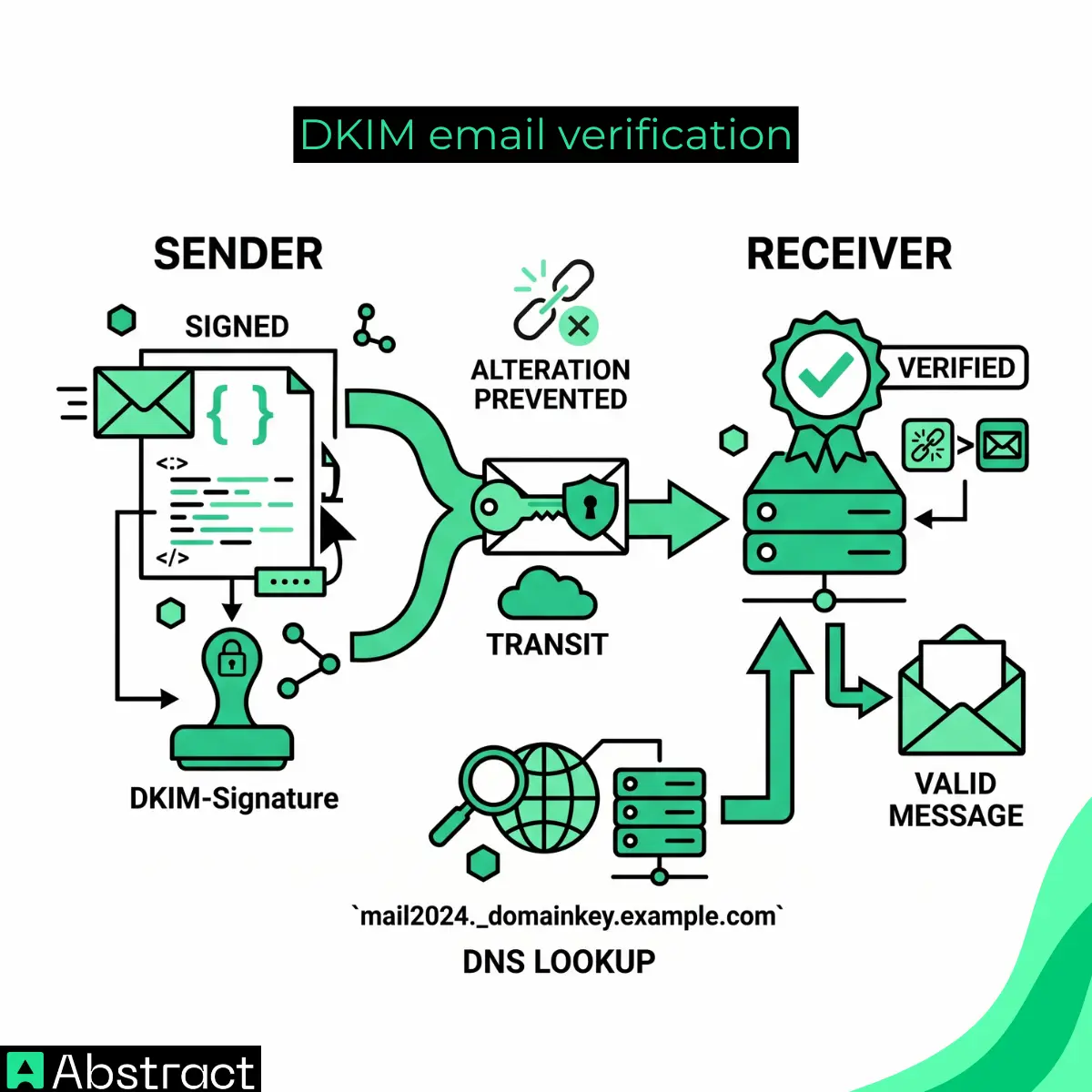
DKIM (DomainKeys Identified Mail, RFC 6376) adds a cryptographic signature to outgoing messages. The receiving server fetches your public key from DNS and verifies the signature. If the message was altered in transit, the signature breaks.
A DKIM-Signature header from a real email:
DKIM-Signature: v=1; a=rsa-sha256; c=relaxed/relaxed;
  d=example.com; s=mail2024;
  h=from:to:subject:date:message-id:content-type;
  bh=47DEQpj8HBSa+/TImW+5JCeuQeRkm5NMpJWZG3hSuFU=;
  b=abc123…
The two fields that matter most:
d=— the signing domain. This is what DMARC checks for alignment against the From: header. Ifd=doesn't match (or share an organizational domain with) the From: address, DMARC fails regardless of whether the signature is valid.s=— the selector. This tells receivers which public key to fetch. The public key lives in DNS at{selector}._domainkey.{domain}. For the record above, that'smail2024._domainkey.example.com.
The rest:
h=— the headers that were signedb=— the signature itself
To look up the public key: dig TXT mail2024._domainkey.example.com
A valid response includes a p= field with the base64-encoded public key.
DMARC: The From Domain Is Who It Claims to Be
DMARC (RFC 7489) does two things SPF and DKIM cannot do alone:
- It requires that the domain in the From: header aligns with the domain authenticated by SPF or DKIM.
- It tells receivers what to do when authentication fails: nothing (none), route to spam (quarantine), or reject outright (reject).
A basic DMARC record:
v=DMARC1; p=quarantine; rua=mailto:dmarc-reports@example.com; pct=100
p=— the policy (none / quarantine / reject)rua=— where aggregate reports gopct=— percentage of failing mail the policy applies to
To look up a DMARC record: dig TXT _dmarc.example.com
How They Run in Sequence
The first two steps happen before DMARC even enters the picture: the sending server connects, and the receiver notes the connecting IP and runs the SPF check against the envelope sender's domain. Pass or fail, that result gets stored.
What matters is what comes next:
- DKIM verification. The receiver fetches the public key from DNS using the selector in the DKIM-Signature header and verifies the signature. Pass or fail.
- DMARC lookup. The receiver fetches the DMARC record for the From: domain. This is the domain your recipient sees in their inbox, not the envelope sender.
- Alignment check. The receiver confirms the domain authenticated by SPF or DKIM matches the From: domain, within the rules of strict or relaxed alignment. SPF alignment uses the envelope sender (Return-Path). DKIM alignment uses the
d=field. DMARC requires at least one to pass and align. - Policy applied. If alignment fails, the receiver acts on
p=none,p=quarantine, orp=reject.
One important edge case: both SPF and DKIM can pass and DMARC can still fail. If neither authenticated domain aligns with the From: address, alignment fails regardless of whether the underlying checks passed.
Strict vs. Relaxed Alignment
This is the detail most implementations get wrong.
Relaxed alignment (the default) requires the authenticated domain to share the organizational domain with the From: address. mail.example.com aligns with example.com under relaxed rules.
Strict alignment requires an exact match. mail.example.com does not align with example.com under strict rules.
You set alignment mode in the DMARC record:
v=DMARC1; p=reject; aspf=s; adkim=r; rua=mailto:dmarc@example.com
aspf=s— strict SPF alignmentadkim=r— relaxed DKIM alignment
Most organizations use relaxed alignment for both. Strict makes sense when you need tighter control and your sending infrastructure is completely consistent.
Common Failure Modes
SPF Passes, DMARC Fails
The most common scenario for organizations using third-party senders: Mailchimp, SendGrid, HubSpot, Salesforce.
Your SPF record authorizes the vendor's IPs. SPF passes. But the From: header shows your domain while the Return-Path uses the vendor's sending domain. Alignment fails. DMARC fails.
The fix: configure the third-party sender to sign outgoing mail with DKIM using your domain as d=. Every major ESP supports custom DKIM signing. Once DKIM passes and aligns, DMARC passes regardless of what SPF does.
DKIM Signature Breaks in Transit
DKIM signs specific headers and the message body. Anything that modifies the message after signing breaks the signature. Common culprits:
- Mailing lists that append footers or modify the subject line
- Email forwarders, especially older Exchange setups
- Some anti-spam gateways that rewrite headers
The IETF introduced ARC (Authenticated Received Chain) as a mechanism for trusted intermediaries to preserve and pass along the original authentication results. Most major mail providers now support ARC. If you're seeing DKIM failures that trace back to forwarding, check whether the intermediary supports ARC before reworking your signing configuration.
Multiple SPF Records
RFC 7208 is explicit: a domain must not publish more than one SPF record. If you publish two, receivers return a permerror and SPF fails silently.
This happens when a new email provider gets added without checking whether an SPF record already exists.
To check: dig TXT example.com | grep "v=spf1"
If you see two lines beginning with v=spf1, consolidate them into one record by merging all include: statements:
v=spf1 include:_spf.google.com include:sendgrid.net include:spf.protection.outlook.com ~all
One more constraint worth knowing: SPF has a 10-lookup limit for include: and a: mechanisms. Exceeding it causes a permerror. If you're approaching the limit, use an SPF flattening service or reduce the number of authorized third-party senders.
Why Authentication Alone Isn't a Deliverability Strategy
A fully authenticated email proves three things: the sending IP was authorized, the message wasn't modified in transit, and the From: domain is legitimate. It says nothing about the destination.
A correctly signed, DMARC-compliant message still bounces if the receiving address doesn't exist, belongs to a disposable inbox, or sits on a spam trap list. Bounces damage your sender reputation whether or not the email was authenticated.
Abstract's Email Validation checks every address against 8M+ known disposable domains, verifies SMTP deliverability in real time, and catches typos before they become hard bounces. Under 200ms. Start for free. No credit card required. Most teams are live in under 5 minutes.
Summary: One System, Three Records
| Protocol | What it authenticates | Where the record lives | What it controls |
|---|---|---|---|
| SPF | Sending IP | example.com TXT | Which servers can send from your domain |
| DKIM | Message integrity | selector._domainkey.example.com TXT | Whether the message was altered in transit |
| DMARC | From: domain identity | _dmarc.example.com TXT | What receivers do when SPF or DKIM fail |
Set up all three. Review your DMARC aggregate reports regularly; they'll surface alignment failures from third-party senders before they become a deliverability crisis. Pair the setup with address validation so authenticated messages reach real inboxes.
