


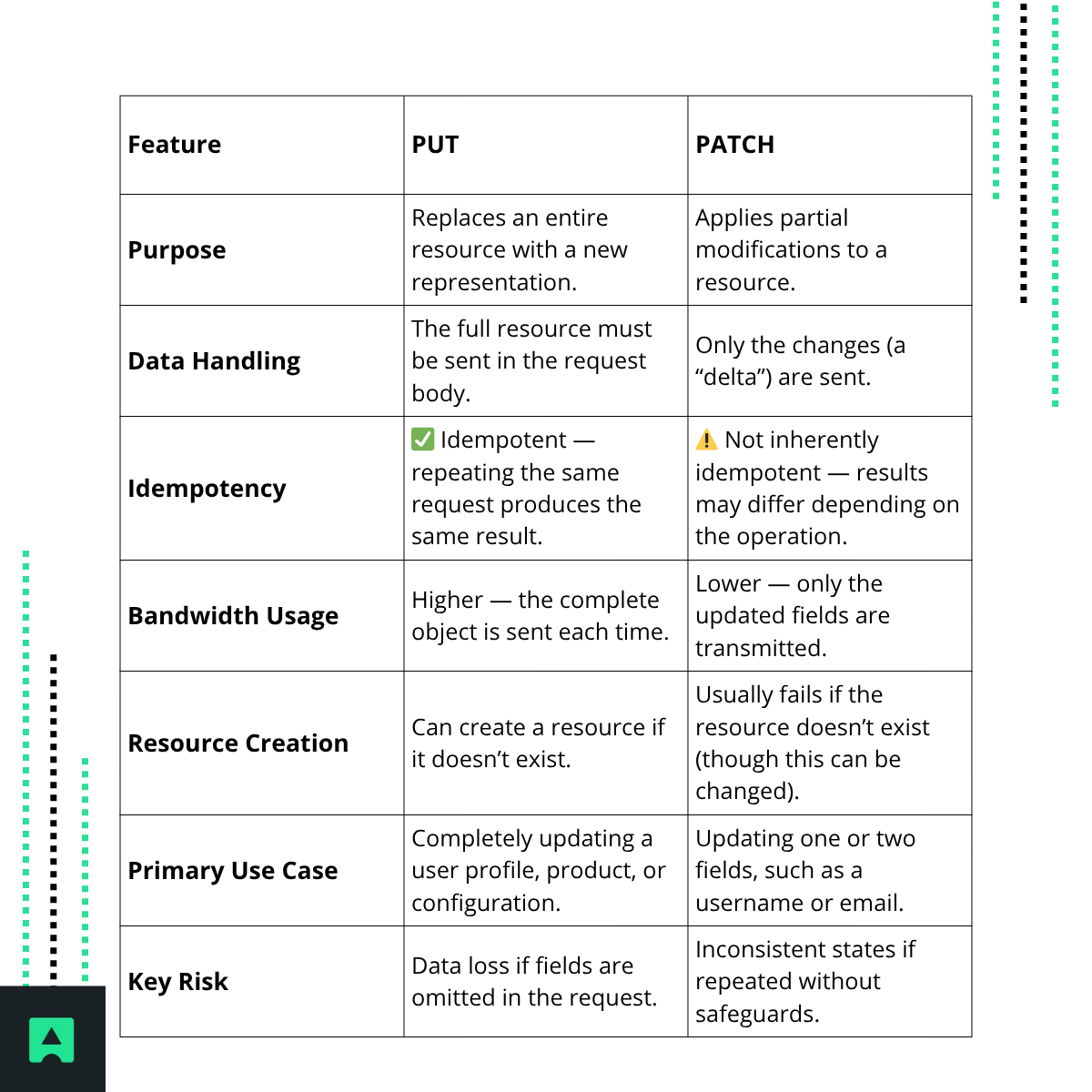
🧩 Quick Comparison: PUT vs PATCH
🧱 The Full Replacement Method: Understanding PUT
The PUT method replaces the entire target resource with a new version sent by the client.
<blockquote> RFC 2616 defines PUT as: “The PUT method requests that the enclosed entity be stored under the supplied Request-URI.” </blockquote>
That means if a resource already exists, it is completely replaced — any fields not included in the request are removed.
Example:
Imagine a /users/123 resource:
{
"id": 123,
"name": "Alice",
"email": "alice@example.com",
"role": "admin"
}
If you send:
{
"id": 123,
"name": "Alice Smith"
}
The server will replace the full record — and unless it’s programmed otherwise, email and role could be lost. ⚠️
Use PUT when: you want a clean, full overwrite of the resource.
🧮 The Partial Modification Method: Understanding PATCH
PATCH lets you send only the changes you want to make.
<blockquote> RFC 5789 describes PATCH as: “The PATCH method applies partial modifications to a resource.” </blockquote>
This is perfect for efficiency — particularly when working with large objects or frequent small updates.
Example
Updating only the email of /users/123:
{
"email": "alice.smith@example.com"
}
The server applies this change without replacing the rest of the data.
Use PATCH when: you only need to change specific fields or perform small, incremental updates.
⚙️ The Critical Difference: Idempotency Explained
A major distinction between PUT and PATCH lies in idempotency — whether multiple identical requests result in the same state.
- PUT is idempotent.
Sending the same PUT request multiple times results in the same resource state.
- PATCH is not necessarily idempotent.
Certain operations (like "op": "add" in JSON Patch) can have cumulative effects.
Making PATCH Safer with Conditional Requests
To prevent race conditions and make PATCH operations more reliable, use ETags and the If-Match header.
Example:
PATCH /users/123 HTTP/1.1
If-Match: "v2"
This ensures the update only applies if the resource’s current version matches "v2", avoiding overwriting newer changes.
Learn more about HTTP headers and conditional requests in our guide to HTTP headers.
💻 Practical Implementation: Multi-Language Code Examples
Using cURL
PUT request:
curl -X PUT https://api.example.com/users/123 \
-H "Content-Type: application/json" \
-d '{"id":123,"name":"Alice","email":"alice@example.com"}'
PATCH request:
curl -X PATCH https://api.example.com/users/123 \
-H "Content-Type: application/json" \
-d '{"email":"alice.smith@example.com"}'
🟢 Node.js (Express)
Server:
const express = require("express");
const app = express();
app.use(express.json());
let users = [{ id: 1, name: "Alice", email: "alice@example.com" }];
app.put("/users/:id", (req, res) => {
const id = parseInt(req.params.id);
users = users.map(u => (u.id === id ? req.body : u));
res.json({ message: "User replaced", user: req.body });
});
app.patch("/users/:id", (req, res) => {
const id = parseInt(req.params.id);
users = users.map(u =>
u.id === id ? { ...u, ...req.body } : u
);
res.json({ message: "User updated", user: users.find(u => u.id === id) });
});
app.listen(3000, () => console.log("Server running on port 3000"));
🐍 Python (Flask)
Server:
from flask import Flask, request, jsonify
app = Flask(__name__)
users = [{"id": 1, "name": "Alice", "email": "alice@example.com"}]
@app.put("/users/<int:user_id>")
def replace_user(user_id):
global users
data = request.json
users = [data if u["id"] == user_id else u for u in users]
return jsonify({"message": "User replaced", "user": data})
@app.patch("/users/<int:user_id>")
def update_user(user_id):
for u in users:
if u["id"] == user_id:
u.update(request.json)
return jsonify({"message": "User updated", "user": u})
if __name__ == "__main__":
app.run(debug=True)
Client (using requests):
import requests
requests.put("https://api.example.com/users/1", json={"id":1,"name":"Alice"})
requests.patch("https://api.example.com/users/1", json={"email":"alice.smith@example.com"})
🧠 The Architect’s Choice: When to Use PUT vs PATCH
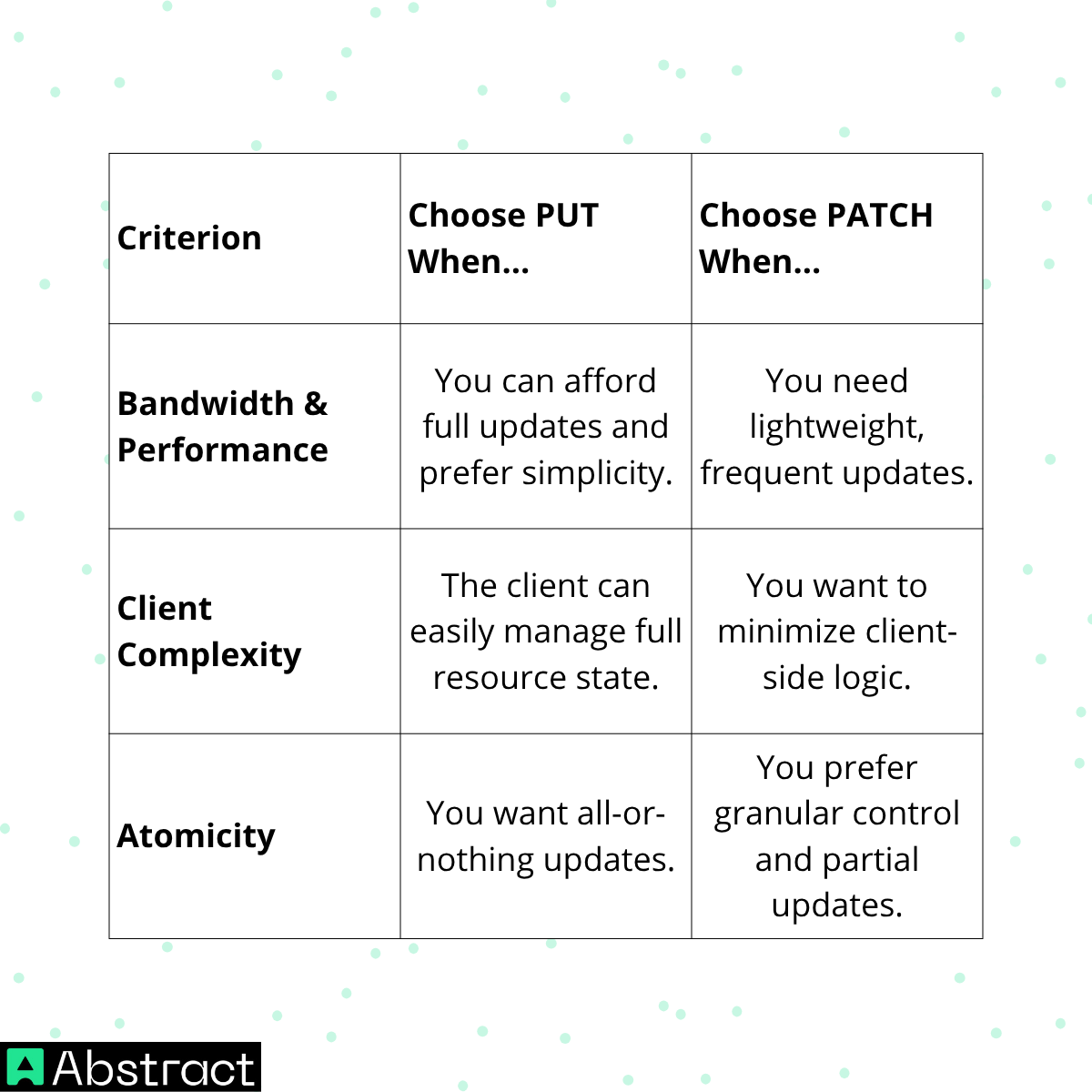
💡 Pro Tip: For APIs serving large or frequently changing datasets, PATCH can dramatically reduce network overhead and latency.
🔍 Advanced Topic: Structuring PATCH Requests
There are two main formats for PATCH requests:
| Format | RFC | Complexity | Idempotent? | Example Use Case |
|---|---|---|---|---|
| JSON Patch | RFC 6902 | High (uses operations like “add”, “remove”, “replace”) | ❌ Not inherently | Updating arrays or nested structures |
| JSON Merge Patch | RFC 7386 | Low | ✅ Yes | Simple field updates |
Example – JSON Patch:
[
{ "op": "replace", "path": "/email", "value": "alice.smith@example.com" }
]
Example – JSON Merge Patch:
{
"email": "alice.smith@example.com"
}
⚠️ Common Pitfalls and Real-World Caveats
- Data loss with PUT: Forgetting fields causes them to be removed.
- Inconsistent state with PATCH: Repeated non-idempotent operations can yield unpredictable results.
- Implementation differences: Some platforms (like ServiceNow’s Table API) treat PUT and PATCH similarly, so always review platform documentation before use.
🏁 Conclusion & Key Takeaways
Both PUT and PATCH are vital tools in REST API design — understanding when and how to use them can make your APIs more efficient, reliable, and intuitive.
✅ Use PUT for complete resource replacements.
✅ Use PATCH for partial, efficient updates.
✅ Employ ETags and conditional headers to make updates safer.
✅ Always test your implementation to avoid unintended data loss.

For more insights on API design, explore these AbstractAPI guides:
