Oops! Something went wrong while submitting the form.
No credit card required
An API waits to be asked. A webhook doesn't wait — it tells you. That's the webhook vs API difference in one sentence: an API uses a request-response model, your app initiates and the server replies; a webhook uses an event-driven model, the server pushes data to your app the moment something happens.
This article covers what each one is, how they differ, when to use each, and when combining both is the right call.
TL;DR
Use an API when you need to request, retrieve, or modify data on demand.
Use a webhook when you need real-time event notifications without polling.
Use both when a webhook alerts your app and an API fetches the full details or performs the next action.
Webhook vs API: the core difference
The fundamental difference comes down to who initiates the communication.
With an API, your application is in the driver's seat. You decide when to make a request, what data to ask for, and how often. The server waits, listens, and responds. This model gives you full control — but it also means you're responsible for asking at the right time.
With a webhook, the server takes the initiative. When a specific event occurs — a payment succeeds, a file uploads, a user signs up — the server sends an HTTP POST request to a URL you've registered. Your app doesn't ask. It listens and reacts.
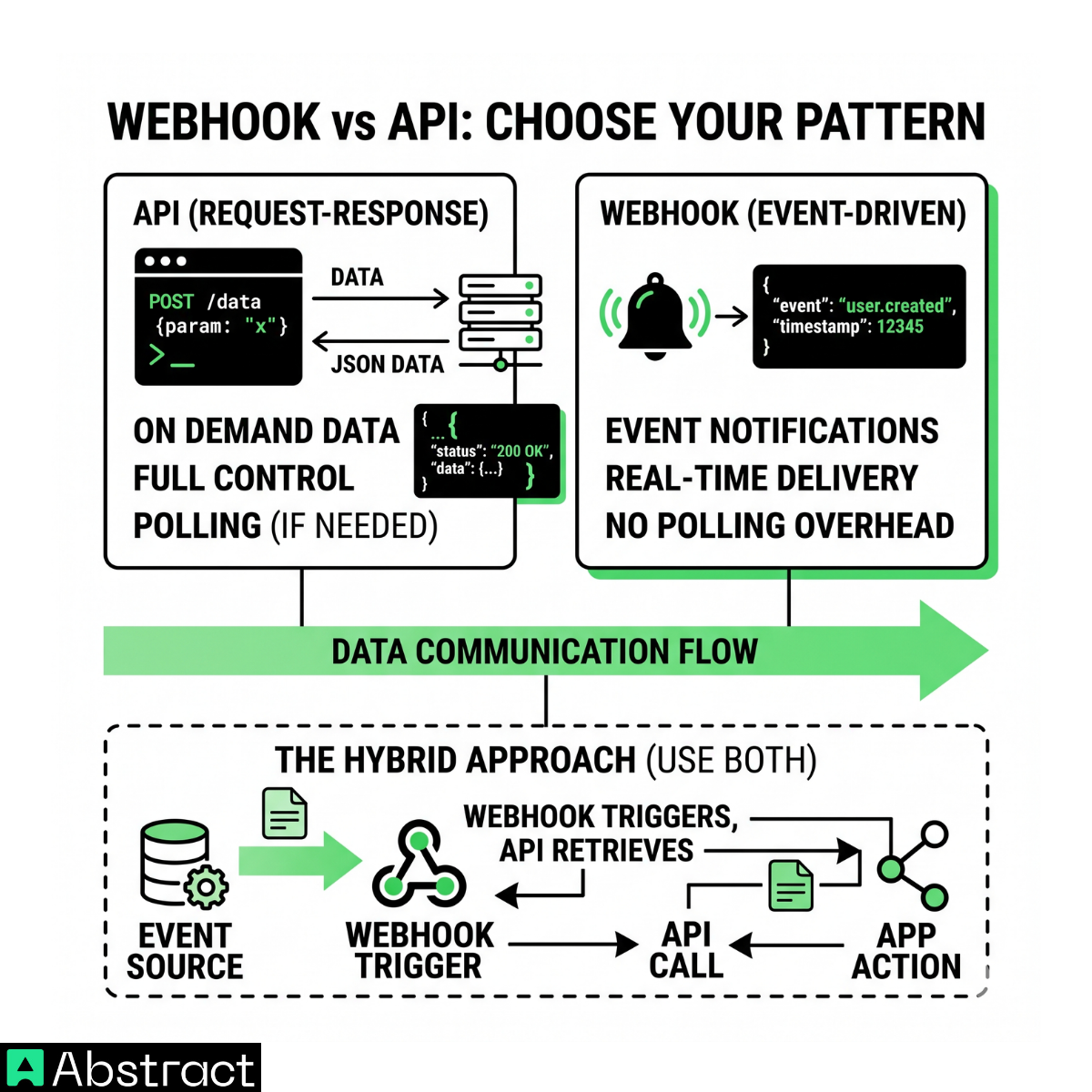
These two patterns aren't mutually exclusive. In practice, many production systems use both: a webhook triggers an action, and an API call follows up to fetch additional data or complete the workflow.
What is an API?
An API (Application Programming Interface) is a structured interface that lets two systems communicate over HTTP. The client always initiates — you send a GET, POST, PUT, or DELETE request, and the server returns a response. Nothing happens until your app asks.
This request-response model gives you granular control: you decide what data to fetch, when to fetch it, and what actions to trigger. That makes APIs the right tool for on-demand operations — retrieving a customer record, creating a support ticket, validating an email before signup, or fetching filtered product data.
What is a webhook?
A webhook is an HTTP callback. You register a URL on your server with a third-party service, and that service sends an HTTP POST to your endpoint the moment a predefined event fires. You're not polling, you're not waiting on a timer — the source system pushes the data to you as soon as the trigger occurs.
This push model is what makes webhooks well-suited for real-time notifications: payment processed, deployment finished, order shipped, new lead created. The event happens, and your app knows about it within milliseconds.
The trade-off: you give up timing control. Your endpoint receives what the source sends, when it decides to send it. You're also responsible for validating incoming payloads, handling retries, and dealing with duplicate events.
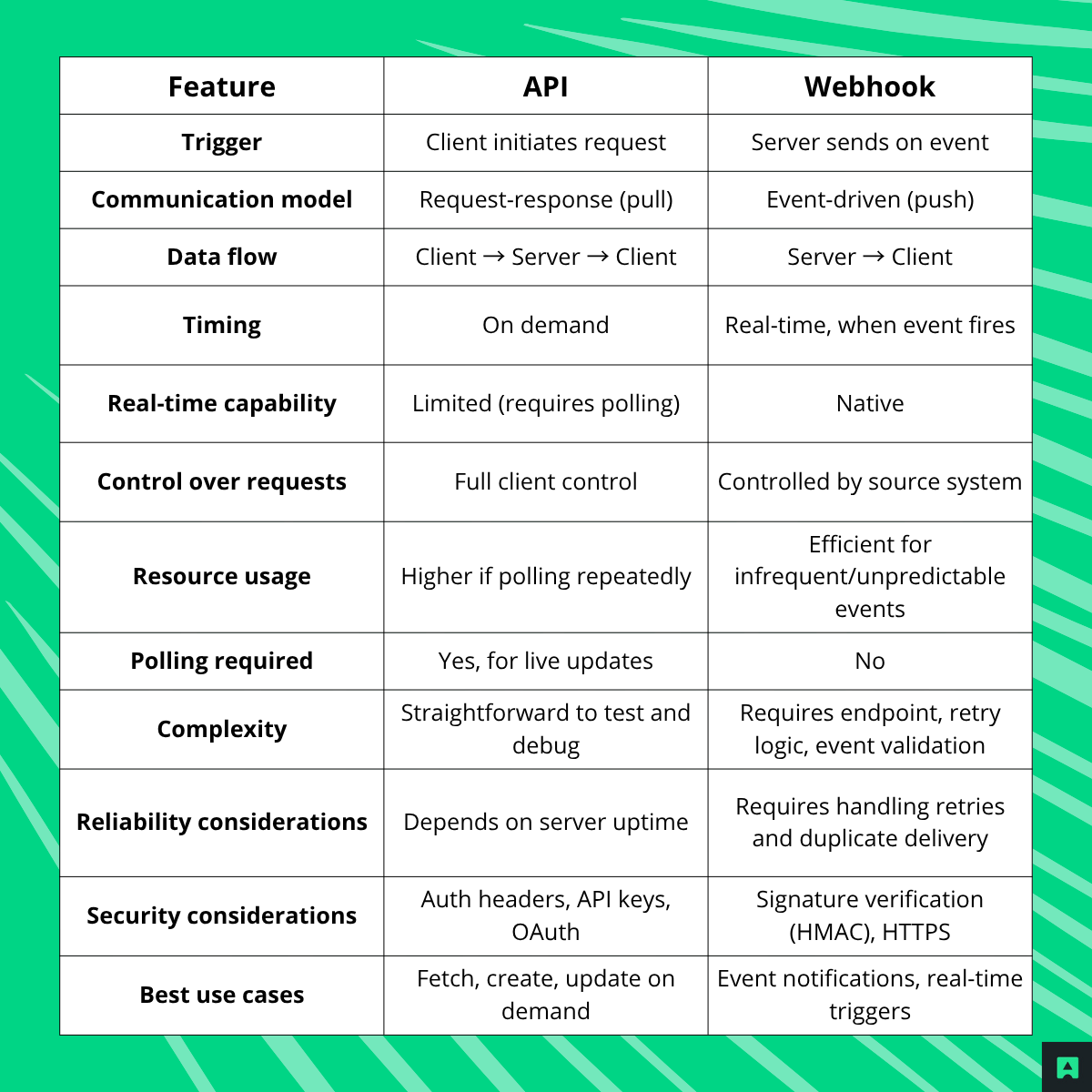
Webhook vs API: side-by-side comparison
Criterion
API
Webhook
Who initiates
Your app (client-side pull)
The external system (server-side push)
Communication model
Request-response
Event-driven callback
Timing
On demand, when your app asks
Immediately when the event occurs
Primary use case
Fetch, create, update, or delete data
Real-time notifications and event triggers
Latency
Depends on polling frequency
Near-instant — fires at event time
Testing
Fire any request on demand from a terminal or API client
Requires a public endpoint or tunneling tool (e.g. ngrok) to test locally
Security model
API keys, OAuth tokens, JWT
HMAC signature verification on incoming payloads
Retry handling
Client controls retries
Provider retries on failure — requires idempotency on your end
Duplicate events
Not applicable
Must be handled explicitly — providers may deliver the same event more than once
Debugging
Full request/response visibility
Requires logging and tooling to replay missed events
Implementing a webhook receiver
Here's a basic webhook receiver in Node.js with Express, including HMAC signature verification — the standard security pattern used by Stripe, GitHub, and most production webhook providers:
const express = require('express');
const crypto = require('crypto');
const app = express();
const WEBHOOK_SECRET = process.env.WEBHOOK_SECRET; // Never hardcode this
// Raw body parser required — signature verification needs the raw buffer
// Respond 200 immediately — handle heavy processing asynchronously
res.status(200).send('OK');
});
app.listen(3000, () => console.log('Webhook receiver running on port 3000'));
Two implementation details worth noting: parse the body as raw bytes before signature verification — parsing it as JSON first changes the bytes and breaks the HMAC check. And always respond 200 immediately; if downstream processing takes time, do it asynchronously to avoid provider retries.
When to use an API
Reach for an API when your app needs to initiate contact with a system and expects an immediate, structured response.
Practical scenarios:
Fetch customer or account data on demand — a user opens their dashboard and your app calls the CRM to retrieve their profile
Validate data before processing — checking an email address via Abstract's Email Validation API before a signup form submits
Create or update records — your app POSTs a new support ticket when a user submits a form
Retrieve filtered or searchable data — querying a product catalog with specific parameters
Run scheduled syncs — a cron job calls an API every hour to pull updated inventory
Perform authenticated actions — initiating a refund, updating a subscription tier, or revoking an access token
APIs are also significantly easier to test: you can fire requests from a terminal or API client without needing to simulate an external event.
When to use a webhook
Use a webhook when you want your app to know about something the moment it happens — without repeatedly asking.
Practical scenarios:
Payment notifications — a payment provider sends a payment.succeeded or payment.failed event the instant a transaction resolves
New lead arrives — a CRM pushes a webhook when a contact form creates a new record
Order status changes — your fulfillment system notifies you when an order ships, is delayed, or is delivered
Subscription updates — a billing platform fires a webhook when a plan upgrades, downgrades, or cancels
CI/CD events — a deployment pipeline notifies your monitoring system when a build passes or fails
Inbound communications — a messaging platform sends a webhook when a new SMS or call arrives
The common thread: all of these events are driven by something external to your app. Polling for them would be wasteful, slow, or both.
Webhook vs API polling
Polling is what happens when you use an API to repeatedly check for updates — sending the same request on a fixed interval to see if anything changed. It works, but it's almost always inefficient.
To make that concrete: if you poll an order status endpoint every 5 minutes to detect when an order ships, that's 288 requests per day, per order — the vast majority returning the same "pending" status. At 1,000 active orders, that's 288,000 requests per day generating zero new information. You're burning through rate limits and server capacity on empty responses.
A webhook collapses that to a single request — fired exactly once, the moment the status changes. The efficiency difference isn't marginal; at scale it directly affects cost, latency, and API quota consumption.
When polling is still the right call:
The external system doesn't support webhooks
You need periodic state reconciliation, not just event reactions
Event volume is so high that webhook delivery itself becomes the bottleneck
You're building a fallback to catch missed webhook deliveries
In those cases, polling remains valid — but be deliberate about the interval and cache aggressively.
Pros and cons
API
Pros:
Full control over when and what you request — never waiting for an event to fire
Supports the complete range of CRUD operations, filtering, and pagination
Easy to test interactively — reproduce any call on demand and inspect the response
Broadly compatible — virtually every external service exposes an API
Synchronous by default, which simplifies error handling for most use cases
Cons:
Requires polling to detect live changes, creating overhead proportional to frequency — at 1,000 active orders polled every 5 minutes, that's 288,000 requests per day returning no new data
High-frequency polling burns through rate limits even when nothing has changed
Client is responsible for timeouts, retries, pagination, and backoff logic
Synchronous model can bottleneck long-running operations without additional patterns
Webhook
Pros:
Near-real-time notifications with zero polling overhead — a single request fired at event time instead of hundreds of empty checks
Efficient for infrequent or unpredictable events where polling frequency is hard to calibrate
Simpler event-driven architecture — no cron jobs, no polling loops
Scales naturally — you only process requests when something actually happens
Cons:
Delivery isn't guaranteed — you must handle duplicate events and implement idempotency
Limited to the event types the source system defines — no custom queries or filtering
Harder to debug: you can't replay a webhook on demand without dedicated tooling
Your endpoint must be publicly reachable and protected against spoofed payloads
Failures are silent unless you implement monitoring — a misconfigured endpoint can quietly drop events
Can webhooks and APIs work together?
Yes — and in most real-world integrations, combining them is the right answer.
Webhooks are excellent triggers, but their payloads are intentionally lightweight — enough to tell you what happened and which resource was affected, not all the data you need to act on it. That's where an API call completes the picture.
Example: Stripe payment + CRM update
A customer completes a purchase. Stripe fires a payment_intent.succeeded webhook to your endpoint.
The payload contains the payment_intent_id and basic metadata — but not the full order, customer record, or line items.
Your handler calls the Stripe API to retrieve the complete payment object.
Your handler calls your CRM's API to update the customer's billing history and tag them as a paying user.
Your handler calls your fulfillment service API to initiate order processing.
app.post('/webhook', async (req, res) => {
const event = JSON.parse(req.body.toString());
if (event.type === 'payment_intent.succeeded') {
const paymentIntentId = event.data.object.id;
// Step 1: Fetch full payment details from Stripe API
The webhook is the trigger. The API calls are the action. Neither works as well alone in this scenario.
Frequently Asked Questions
What is the difference between a webhook and an API?
The core difference is who initiates the communication. With an API, your application sends a request and waits for a response; it pulls data on demand. With a webhook, the external system pushes data to your registered URL the moment an event occurs, so you receive updates automatically without polling.
Is a webhook the same as an API?
Not exactly. Webhooks use HTTP just like APIs do, but they follow a push model rather than a pull model. An API waits to be asked; a webhook proactively notifies your endpoint when something happens. You can think of a webhook as a specialized, event-driven HTTP integration rather than a general-purpose API.
When should I use a webhook instead of an API?
Use a webhook when you need near-instant notification of events (such as payment confirmations, order status changes, or deployment completions) and you want to avoid the overhead of repeated polling. Use an API when you need to fetch or modify data on demand, validate input before processing, or run scheduled syncs where the timing is under your control.
Why are webhooks more efficient than polling an API?
Polling generates requests constantly regardless of whether anything has changed. For example, checking order status every five minutes across 1,000 orders produces hundreds of thousands of daily requests (most returning unchanged data). Webhooks fire only when an event actually occurs, cutting unnecessary traffic and reducing latency to near-zero.
How do webhooks handle security compared to APIs?
APIs typically authenticate callers with API keys or OAuth tokens attached to outgoing requests. Webhooks secure incoming payloads differently: the sending service signs the request body with an HMAC signature, and your endpoint verifies that signature before processing the data. This confirms the payload came from the expected source and wasn't tampered with in transit.
Can I use webhooks and APIs together in the same system?
Yes, this is the recommended approach for most production systems. A webhook fires when an event occurs to give you an immediate notification, and your application then makes a request to retrieve the full record or trigger the next action. Using both patterns together gives you real-time responsiveness from webhooks and the rich data access and control that APIs provide.
Conclusion
The choice between a webhook and an API comes down to the communication pattern your use case actually needs:
Use an API if you need to request or modify data on demand, with full control over timing and parameters.
Use a webhook if you need event-driven notifications delivered in real time, without polling overhead.
Use both if you need a webhook to trigger your app and an API to retrieve full data or perform follow-up actions.
Most production integrations end up combining the two. Getting the push vs. pull distinction right is what lets you build systems that are efficient, reliable, and straightforward to maintain.
The fundamental difference comes down to who initiates the communication.
With an API, your application is in the driver's seat. You decide when to make a request, what data to ask for, and how often. The server waits, listens, and responds. This model gives you full control — but it also means you're responsible for asking at the right time.
With a webhook, the server takes the initiative. When a specific event occurs — a payment succeeds, a file uploads, a user signs up — the server sends an HTTP POST request to a URL you've registered. Your app doesn't ask. It listens and reacts.
These two patterns aren't mutually exclusive. In practice, many production systems use both: a webhook triggers an action, and an API call follows up to fetch additional data or complete the workflow.
What is an API?
An API (Application Programming Interface) is a structured interface that lets two systems communicate over HTTP. The client always initiates — you send a GET, POST, PUT, or DELETE request, and the server returns a response. Nothing happens until your app asks.
This request-response model gives you granular control: you decide what data to fetch, when to fetch it, and what actions to trigger. That makes APIs the right tool for on-demand operations — retrieving a customer record, creating a support ticket, validating an email before signup, or fetching filtered product data.
What is a webhook?
A webhook is an HTTP callback. You register a URL on your server with a third-party service, and that service sends an HTTP POST to your endpoint the moment a predefined event fires. You're not polling, you're not waiting on a timer — the source system pushes the data to you as soon as the trigger occurs.
This push model is what makes webhooks well-suited for real-time notifications: payment processed, deployment finished, order shipped, new lead created. The event happens, and your app knows about it within milliseconds.
The trade-off: you give up timing control. Your endpoint receives what the source sends, when it decides to send it. You're also responsible for validating incoming payloads, handling retries, and dealing with duplicate events.
Webhook vs API: side-by-side comparison
Criterion
API
Webhook
Who initiates
Your app (client-side pull)
The external system (server-side push)
Communication model
Request-response
Event-driven callback
Timing
On demand, when your app asks
Immediately when the event occurs
Primary use case
Fetch, create, update, or delete data
Real-time notifications and event triggers
Latency
Depends on polling frequency
Near-instant — fires at event time
Testing
Fire any request on demand from a terminal or API client
Requires a public endpoint or tunneling tool (e.g. ngrok) to test locally
Security model
API keys, OAuth tokens, JWT
HMAC signature verification on incoming payloads
Retry handling
Client controls retries
Provider retries on failure — requires idempotency on your end
Duplicate events
Not applicable
Must be handled explicitly — providers may deliver the same event more than once
Debugging
Full request/response visibility
Requires logging and tooling to replay missed events
Implementing a webhook receiver
Here's a basic webhook receiver in Node.js with Express, including HMAC signature verification — the standard security pattern used by Stripe, GitHub, and most production webhook providers:
const express = require('express');
const crypto = require('crypto');
const app = express();
const WEBHOOK_SECRET = process.env.WEBHOOK_SECRET; // Never hardcode this
// Raw body parser required — signature verification needs the raw buffer
// Respond 200 immediately — handle heavy processing asynchronously
res.status(200).send('OK');
});
app.listen(3000, () => console.log('Webhook receiver running on port 3000'));
Two implementation details worth noting: parse the body as raw bytes before signature verification — parsing it as JSON first changes the bytes and breaks the HMAC check. And always respond 200 immediately; if downstream processing takes time, do it asynchronously to avoid provider retries.
When to use an API
Reach for an API when your app needs to initiate contact with a system and expects an immediate, structured response.
Practical scenarios:
Fetch customer or account data on demand — a user opens their dashboard and your app calls the CRM to retrieve their profile
Validate data before processing — checking an email address via Abstract's Email Validation API before a signup form submits
Create or update records — your app POSTs a new support ticket when a user submits a form
Retrieve filtered or searchable data — querying a product catalog with specific parameters
Run scheduled syncs — a cron job calls an API every hour to pull updated inventory
Perform authenticated actions — initiating a refund, updating a subscription tier, or revoking an access token
APIs are also significantly easier to test: you can fire requests from a terminal or API client without needing to simulate an external event.
When to use a webhook
Use a webhook when you want your app to know about something the moment it happens — without repeatedly asking.
Practical scenarios:
Payment notifications — a payment provider sends a payment.succeeded or payment.failed event the instant a transaction resolves
New lead arrives — a CRM pushes a webhook when a contact form creates a new record
Order status changes — your fulfillment system notifies you when an order ships, is delayed, or is delivered
Subscription updates — a billing platform fires a webhook when a plan upgrades, downgrades, or cancels
CI/CD events — a deployment pipeline notifies your monitoring system when a build passes or fails
Inbound communications — a messaging platform sends a webhook when a new SMS or call arrives
The common thread: all of these events are driven by something external to your app. Polling for them would be wasteful, slow, or both.
Webhook vs API polling
Polling is what happens when you use an API to repeatedly check for updates — sending the same request on a fixed interval to see if anything changed. It works, but it's almost always inefficient.
To make that concrete: if you poll an order status endpoint every 5 minutes to detect when an order ships, that's 288 requests per day, per order — the vast majority returning the same "pending" status. At 1,000 active orders, that's 288,000 requests per day generating zero new information. You're burning through rate limits and server capacity on empty responses.
A webhook collapses that to a single request — fired exactly once, the moment the status changes. The efficiency difference isn't marginal; at scale it directly affects cost, latency, and API quota consumption.
When polling is still the right call:
The external system doesn't support webhooks
You need periodic state reconciliation, not just event reactions
Event volume is so high that webhook delivery itself becomes the bottleneck
You're building a fallback to catch missed webhook deliveries
In those cases, polling remains valid — but be deliberate about the interval and cache aggressively.
Pros and cons
API
Pros:
Full control over when and what you request — never waiting for an event to fire
Supports the complete range of CRUD operations, filtering, and pagination
Easy to test interactively — reproduce any call on demand and inspect the response
Broadly compatible — virtually every external service exposes an API
Synchronous by default, which simplifies error handling for most use cases
Cons:
Requires polling to detect live changes, creating overhead proportional to frequency — at 1,000 active orders polled every 5 minutes, that's 288,000 requests per day returning no new data
High-frequency polling burns through rate limits even when nothing has changed
Client is responsible for timeouts, retries, pagination, and backoff logic
Synchronous model can bottleneck long-running operations without additional patterns
Webhook
Pros:
Near-real-time notifications with zero polling overhead — a single request fired at event time instead of hundreds of empty checks
Efficient for infrequent or unpredictable events where polling frequency is hard to calibrate
Simpler event-driven architecture — no cron jobs, no polling loops
Scales naturally — you only process requests when something actually happens
Cons:
Delivery isn't guaranteed — you must handle duplicate events and implement idempotency
Limited to the event types the source system defines — no custom queries or filtering
Harder to debug: you can't replay a webhook on demand without dedicated tooling
Your endpoint must be publicly reachable and protected against spoofed payloads
Failures are silent unless you implement monitoring — a misconfigured endpoint can quietly drop events
Can webhooks and APIs work together?
Yes — and in most real-world integrations, combining them is the right answer.
Webhooks are excellent triggers, but their payloads are intentionally lightweight — enough to tell you what happened and which resource was affected, not all the data you need to act on it. That's where an API call completes the picture.
Example: Stripe payment + CRM update
A customer completes a purchase. Stripe fires a payment_intent.succeeded webhook to your endpoint.
The payload contains the payment_intent_id and basic metadata — but not the full order, customer record, or line items.
Your handler calls the Stripe API to retrieve the complete payment object.
Your handler calls your CRM's API to update the customer's billing history and tag them as a paying user.
Your handler calls your fulfillment service API to initiate order processing.
app.post('/webhook', async (req, res) => {
const event = JSON.parse(req.body.toString());
if (event.type === 'payment_intent.succeeded') {
const paymentIntentId = event.data.object.id;
// Step 1: Fetch full payment details from Stripe API
The webhook is the trigger. The API calls are the action. Neither works as well alone in this scenario.
Frequently asked questions
Is a webhook an API?
Not exactly. A webhook is a type of HTTP integration — a URL that receives automated POST requests from external systems when events occur. An API is a structured interface your app calls on demand. Both use HTTP, but the communication model differs: APIs are pull-based, webhooks are push-based.
Are webhooks better than APIs?
Neither is universally better. Webhooks suit event-driven, real-time notifications. APIs give you more control and flexibility for on-demand operations. The right choice depends on whether your use case is reactive (webhook) or proactive (API).
What is the difference between webhook and API polling?
Polling means your app calls an API repeatedly to check for updates. Webhooks eliminate that overhead by pushing data to your app when the event actually occurs. For irregular or infrequent events, webhooks are dramatically more efficient. Where polling is unavoidable, increase the interval and cache responses aggressively.
Which is more secure: webhook or API?
Both require deliberate security practices. APIs use authentication mechanisms like API keys, OAuth tokens, or JWT. Webhooks should be validated using HMAC signature verification — most providers include a signature in the request headers that you verify against the raw payload. Always enforce HTTPS for both, and treat any unverified webhook payload as untrusted.
Can I use a webhook and an API together?
Yes — and it's often the strongest pattern. A webhook fires when an event occurs, and your app follows up with an API call to retrieve full data or perform the next action. The Stripe example above is a textbook case.
How do I handle webhook failures and missed events?
Most providers retry failed deliveries on a schedule (Stripe retries over 3 days, for example). Your endpoint should return 200 immediately and process asynchronously to avoid timeouts that trigger retries. Implement idempotency keys to handle duplicate deliveries safely. For catching events your endpoint missed entirely, pair your webhook handler with a periodic reconciliation job that polls the API for recent state.
Conclusion
The choice between a webhook and an API comes down to the communication pattern your use case actually needs:
Use an API if you need to request or modify data on demand, with full control over timing and parameters.
Use a webhook if you need event-driven notifications delivered in real time, without polling overhead.
Use both if you need a webhook to trigger your app and an API to retrieve full data or perform follow-up actions.
Most production integrations end up combining the two. Getting the push vs. pull distinction right is what lets you build systems that are efficient, reliable, and straightforward to maintain.