Guides
Last updated
August 11, 2025

Authentication vs. Authorization: Core Concepts for Securing Your Apps

Nicolas Rios
Nicolas Rios

Table of Contents:

Get your free
 API key now
stars rating
4.8 from 1,863 votes
See why the best developers build on Abstract
START FOR FREE
Thank you! Your submission has been received!
Oops! Something went wrong while submitting the form.
No credit card required

Authentication vs Authorization

The digital ecosystem is full of nuances that, at first glance, seem trivial: synonyms, overlapping ideas. But they often hide critical distinctions. A perfect example? Authentication and authorization.

These two concepts are often used interchangeably in digital security, but they represent fundamentally different layers of protection

Understanding the differences between them and how they work together is essential to building secure, well-behaved applications and APIs.

Let's break them down clearly and explore how you can use both to harden your systems against misuse and attacks. Ready to jump in?

A Tale of Boarding Passes

Imagine you are standing at an airport venue. You've a numbered ticket associated with your ID. Once you reach the boarding gate, the guard will ask you to showcase the ID stated on the ticket, to confirm you are who you say you are. 

In other words, Authentication is about proving identity, whether it is by showing your picture on your ID, by writing down a password, or by pressing your finger on a spot for biometric recognition.

Let's imagine you're on the plane now. What do you do? Do you plunge yourself into a cozy first-class seat? Do you grab one of these lovely pouches waiting for business travelers? 

No! You continue your pilgrimage to that squeezed-in economic seat you have booked.

And why do you do that? Because the number on your ticket says that seating there and accessing economic-class benefits is all that you're authorized to. Thus, authorization is the process of granting permission to do something; it's about granting permissions.

But, of course, software development and usage have little to do with boarding a plane, so let's now move from airports to APIs.
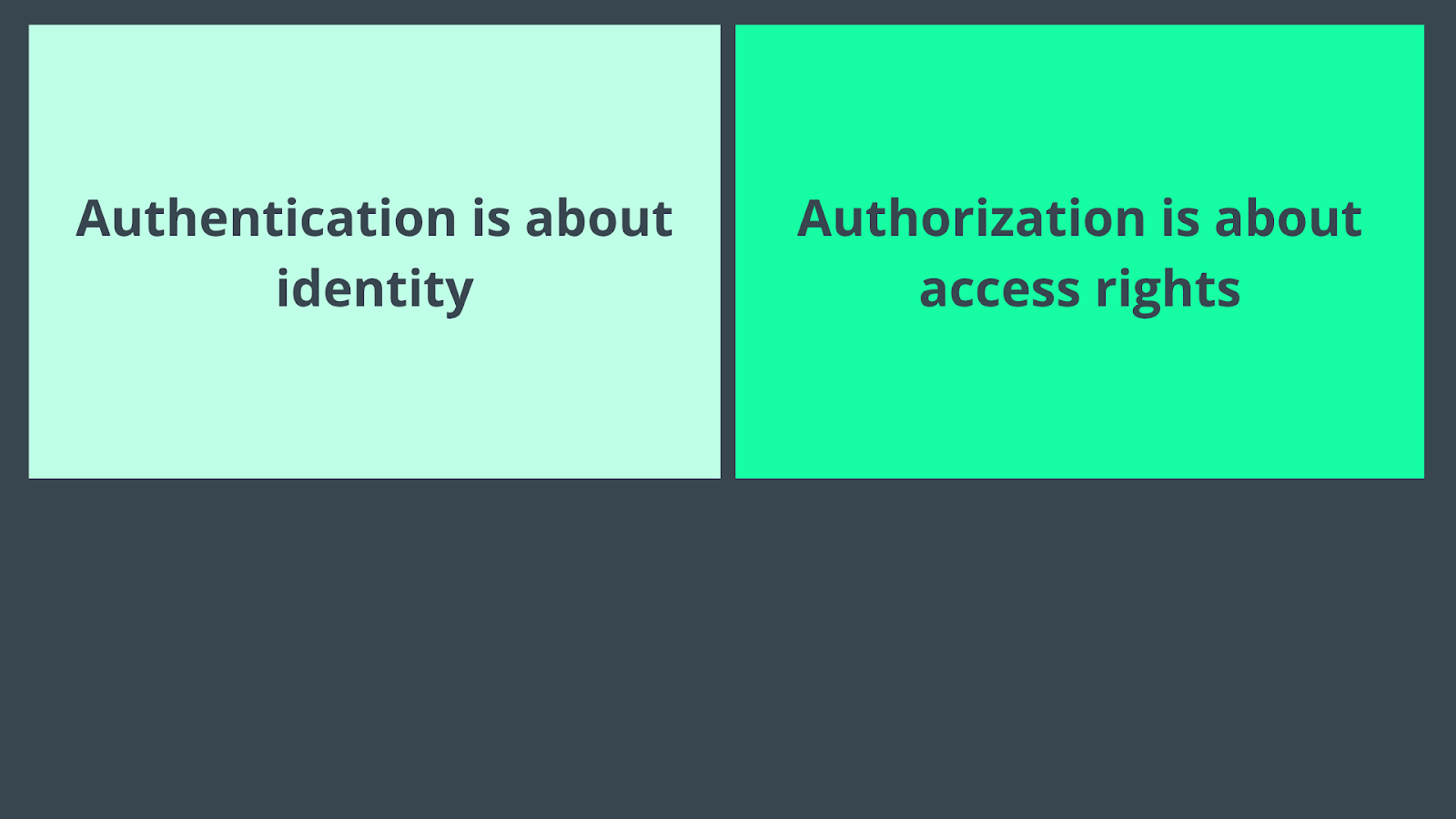
Authentication vs Authorization - Abstract API

Authentication in the Digital World

Modern applications send and receive sensitive data via APIs. Before granting access to anything, a secure API should authenticate the requester, confirming that they are legitimate. This helps to prevent attacks and malicious data usage.

Here are some of the most common methods used to authenticate users or apps:

Usernames-Passwords

This is the digital authentication method per excellence. You know how it goes: a user provides a unique ID (username or email) and a secret (password) associated with it.

If true, you get logged in. If not, your account might even get blocked after several failed login attempts. 

Still, if not properly secured, this authentication method is vulnerable to credential stuffing, reuse attacks, and brute-force attempts. You can strengthen the security by hashing passwords and adding rate-limiting to login attempts.

Multi-Factor Authentication (MFA)

MFA adds one or more additional steps to the authentication process. It typically combines:

  • Something you know (eg, password, token).
  • Something you have (eg, authenticator app, hardware token).
  • Something you are (biometrics).

By requiring multiple forms of proof, MFA will reduce the risk of unauthorized access, even if one factor is compromised.

Biometrics

Biometric authentication uses unique physical traits (e.g., iris, fingerprint, face) to verify a user's identity. It is typically implemented in high-security environments and mobile apps. 

But as spy movies love to show, this method can be bypassed. So, it's usually combined with another authentication factor (e.g., device trust or password) for enhanced security. 

API Keys

API keys are static strings used by apps or services to identify themselves to an API. They're usually sent in query parameters or headers

This makes them simple to implement and widely supported, although data encryption might be needed to avoid compromising security if leaked or hardcoded.

Using API keys with rate limits, periodic rotation policies, and scopes helps prevent API abuse and strengthens security. 

Authorization in the Digital World

Once a user or system is authenticated, the next question is: What are they allowed to do? Which data can they access? This is when authorization comes into play.

Authorization defines access and privileges. Briefly, what data or operations a user (or app) can perform. 

While authentication is often implemented on the user side, authorization logic is typically enforced server-side, in your API gateway, business logic, or database layer.

Here are three common approaches:

Role-Based Access Control (RBAC)

Different users are assigned different roles. Each role has predefined permissions. This simplifies access control, as permissions don't need to be assigned one by one, but are determined groupally.

It's an authorization protocol relatively easy to implement, making it ideal for small to medium-sized apps, internal tools, or SaaS apps with distinct user types.

OAuth Scopes

OAuth scopes define what an access token can do, essentially limiting the token's powers. It helps protect APIs in third-party integrations or complex workflows, strengthening API protocols and usage limits.

Tiered Permissions

In SaaS systems, a user's access often depends on their subscription tier. This method ties authorization directly to business logic, helping control resource usage and monetization. 

When identifying the user's plan, the software can authorize the user to access (or not) specific endpoints, responses, and actions. 

Authentication + Autorization

Now it's time to see how authentication and authorization work together to manage which users have access to the software, and what they can actually do with it.

Keep in mind that authentication always comes before authorization: you must prove who you are before the system can decide what you're allowed to do. So, usually, the sequence goes like this:

  1. A user signs in with a password, API key, biometric scan, or MFA.
  2. The server verifies their identity.
  3. The server then checks what that user is allowed to do (via roles, scopes, permissions).
  4. If unauthorized, the system should respond with 403 Forbidden or take other action (e.g., rate-limit or reject the request).

Authentication & Authorization with AbstractAPI

We've mentioned API keys as an authentication method. However, some platforms, like Abstract API, use them as both an authentication and authorization mechanism.

How does this work? Well, as you may know by now, Abstract offers a wide range of APIs. When you use them, the software generates a unique API key you have to include in every API call you issue.

When you include your api_key in a request, AbstractAPI uses it to verify that the request is coming from a valid, registered user (you).

The key is linked to your account's plan, which determines your permissions, for eg, your monthly request quota. 

Once you're authenticated, the same key will authorize your access to specific API endpoints and features, and restrict the number of requests you can make, based on your subscription tier.

__wf_reserved_inherit

If you try to exceed your quota or access an endpoint outside your plan, you'll get a relevant HTTP error, just like trying to sit in first class with an economy ticket.
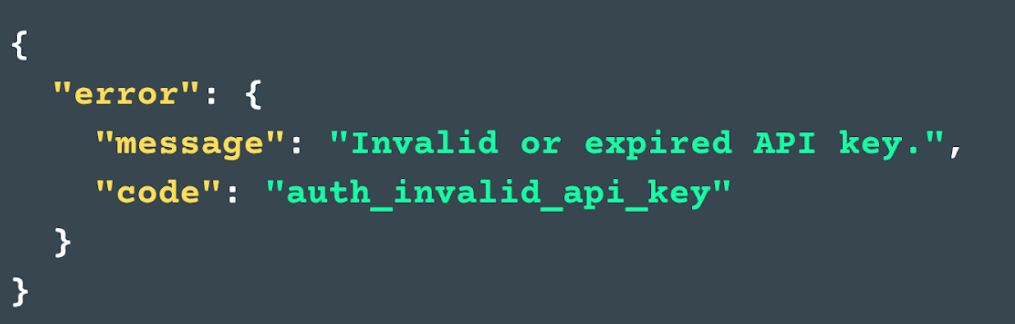
__wf_reserved_inherit

This model allows developers to elegantly handle authentication and authorization from a single point of access control, simplifying security measures while still enforcing limits and access controls.

Know Who, Know What

Understanding the difference between authentication and authorization goes beyond mere semantics when software development is at stake. Building secure, trustworthy APIs and apps requires a solid understanding of these concepts, so here's one last recap:

  • Authentication is who you are.
  • Authorization is what you can do.

Simple, right? But in practice, implementing these layers securely can become complex and error-prone if not addressed early.

Our take? Combine both into a single, easy-to-use mechanism, like an API key.

At Abstract API, we design APIs with built-in authentication and scoped access, giving you strong security without unnecessary complexity.

Smarter development starts with the right tools. Discover them at Abstract API.

Frequently Asked Questions

What is the difference between authentication and authorization?

Authentication is the process of verifying who a user is, confirming their identity using credentials like a password, API key, or biometric. Authorization determines what that verified user is allowed to do, such as which resources they can access or which actions they can take. The two concepts are related but distinct: authentication answers "who are you?" while authorization answers "what are you allowed to do?"

Which comes first, authentication or authorization?

Authentication always comes first. A system must confirm a user's identity before it can evaluate their permissions. Think of it like an airport: you show your ID to prove who you are (authentication), then your boarding pass is checked to confirm you're allowed on a specific flight (authorization). Skipping authentication means authorization has no verified identity to work with.

What HTTP status codes relate to authentication and authorization failures?

A 401 Unauthorized response indicates an authentication failure: the request lacks valid credentials or the credentials could not be verified. A 403 Forbidden response indicates an authorization failure: the identity is confirmed, but the user does not have permission to access the requested resource. Using the correct code helps clients understand whether they need to re-authenticate or whether access is simply denied.

How do RBAC and OAuth scopes relate to authorization?

Role-based access control (RBAC) assigns permissions to roles rather than individual users, so a user's access is determined by the role they are assigned (e.g., admin, editor, viewer). OAuth scopes are a form of authorization used in API and third-party integrations, where a token is issued with specific permissions attached. Both are common mechanisms for implementing authorization after a user or application has already been authenticated.

Can API keys handle both authentication and authorization?

Yes. API keys are a common example of a mechanism that serves both purposes at once. When a client presents an API key, the server verifies the key to confirm the caller's identity (authentication) and then looks up what that key is permitted to do, such as access limits or endpoint restrictions, to enforce permissions (authorization). Combining both layers into a single access control point simplifies security for API-based architectures.

What is a common mistake developers make with authentication and authorization?

A frequent mistake is treating authentication as sufficient for security and skipping explicit authorization checks. Just because a user is logged in does not mean they should have access to every resource. For example, a valid user might try to access another user's data by manipulating a URL or request parameter. Always enforce authorization checks on the server side, regardless of whether the request comes from an authenticated user.

Let’s send your first free
API
call
See why the best developers build on Abstract
Get your free api

A Tale of Boarding Passes

Imagine you are standing at an airport venue. You've a numbered ticket associated with your ID. Once you reach the boarding gate, the guard will ask you to showcase the ID stated on the ticket, to confirm you are who you say you are. 

In other words, Authentication is about proving identity, whether it is by showing your picture on your ID, by writing down a password, or by pressing your finger on a spot for biometric recognition.

Let's imagine you're on the plane now. What do you do? Do you plunge yourself into a cozy first-class seat? Do you grab one of these lovely pouches waiting for business travelers? 

No! You continue your pilgrimage to that squeezed-in economic seat you have booked.

And why do you do that? Because the number on your ticket says that seating there and accessing economic-class benefits is all that you're authorized to. Thus, authorization is the process of granting permission to do something; it's about granting permissions.

But, of course, software development and usage have little to do with boarding a plane, so let's now move from airports to APIs.

Authentication vs Authorization - Abstract API

Authentication in the Digital World

Modern applications send and receive sensitive data via APIs. Before granting access to anything, a secure API should authenticate the requester, confirming that they are legitimate. This helps to prevent attacks and malicious data usage.

Here are some of the most common methods used to authenticate users or apps:

Usernames-Passwords

This is the digital authentication method per excellence. You know how it goes: a user provides a unique ID (username or email) and a secret (password) associated with it.

If true, you get logged in. If not, your account might even get blocked after several failed login attempts. 

Still, if not properly secured, this authentication method is vulnerable to credential stuffing, reuse attacks, and brute-force attempts. You can strengthen the security by hashing passwords and adding rate-limiting to login attempts.

Multi-Factor Authentication (MFA)

MFA adds one or more additional steps to the authentication process. It typically combines:

  • Something you know (eg, password, token).
  • Something you have (eg, authenticator app, hardware token).
  • Something you are (biometrics).

By requiring multiple forms of proof, MFA will reduce the risk of unauthorized access, even if one factor is compromised.

Biometrics

Biometric authentication uses unique physical traits (e.g., iris, fingerprint, face) to verify a user's identity. It is typically implemented in high-security environments and mobile apps. 

But as spy movies love to show, this method can be bypassed. So, it's usually combined with another authentication factor (e.g., device trust or password) for enhanced security. 

API Keys

API keys are static strings used by apps or services to identify themselves to an API. They're usually sent in query parameters or headers

This makes them simple to implement and widely supported, although data encryption might be needed to avoid compromising security if leaked or hardcoded.

Using API keys with rate limits, periodic rotation policies, and scopes helps prevent API abuse and strengthens security. 

Authorization in the Digital World

Once a user or system is authenticated, the next question is: What are they allowed to do? Which data can they access? This is when authorization comes into play.

Authorization defines access and privileges. Briefly, what data or operations a user (or app) can perform. 

While authentication is often implemented on the user side, authorization logic is typically enforced server-side, in your API gateway, business logic, or database layer.

Here are three common approaches:

Role-Based Access Control (RBAC)

Different users are assigned different roles. Each role has predefined permissions. This simplifies access control, as permissions don't need to be assigned one by one, but are determined groupally.

It's an authorization protocol relatively easy to implement, making it ideal for small to medium-sized apps, internal tools, or SaaS apps with distinct user types.

OAuth Scopes

OAuth scopes define what an access token can do, essentially limiting the token's powers. It helps protect APIs in third-party integrations or complex workflows, strengthening API protocols and usage limits.

Tiered Permissions

In SaaS systems, a user's access often depends on their subscription tier. This method ties authorization directly to business logic, helping control resource usage and monetization. 

When identifying the user's plan, the software can authorize the user to access (or not) specific endpoints, responses, and actions. 

Authentication + Autorization

Now it's time to see how authentication and authorization work together to manage which users have access to the software, and what they can actually do with it.

Keep in mind that authentication always comes before authorization: you must prove who you are before the system can decide what you're allowed to do. So, usually, the sequence goes like this:

  1. A user signs in with a password, API key, biometric scan, or MFA.
  2. The server verifies their identity.
  3. The server then checks what that user is allowed to do (via roles, scopes, permissions).
  4. If unauthorized, the system should respond with 403 Forbidden or take other action (e.g., rate-limit or reject the request).

Authentication & Authorization with AbstractAPI

We've mentioned API keys as an authentication method. However, some platforms, like Abstract API, use them as both an authentication and authorization mechanism.

How does this work? Well, as you may know by now, Abstract offers a wide range of APIs. When you use them, the software generates a unique API key you have to include in every API call you issue.

When you include your api_key in a request, AbstractAPI uses it to verify that the request is coming from a valid, registered user (you).

The key is linked to your account's plan, which determines your permissions, for eg, your monthly request quota. 

Once you're authenticated, the same key will authorize your access to specific API endpoints and features, and restrict the number of requests you can make, based on your subscription tier.

__wf_reserved_inherit

If you try to exceed your quota or access an endpoint outside your plan, you'll get a relevant HTTP error, just like trying to sit in first class with an economy ticket.

__wf_reserved_inherit

This model allows developers to elegantly handle authentication and authorization from a single point of access control, simplifying security measures while still enforcing limits and access controls.

Know Who, Know What

Understanding the difference between authentication and authorization goes beyond mere semantics when software development is at stake. Building secure, trustworthy APIs and apps requires a solid understanding of these concepts, so here's one last recap:

  • Authentication is who you are.
  • Authorization is what you can do.

Simple, right? But in practice, implementing these layers securely can become complex and error-prone if not addressed early.

Our take? Combine both into a single, easy-to-use mechanism, like an API key.

At Abstract API, we design APIs with built-in authentication and scoped access, giving you strong security without unnecessary complexity.

Smarter development starts with the right tools. Discover them at Abstract API.

Frequently Asked Questions

What is the difference between authentication and authorization?

Authentication is the process of verifying who a user is — confirming their identity using credentials like a password, API key, or biometric. Authorization determines what that verified user is allowed to do, such as which resources they can access or which actions they can take. The two concepts are related but distinct: authentication answers "who are you?" while authorization answers "what are you allowed to do?"

Which comes first, authentication or authorization?

Authentication always comes first. A system must confirm a user's identity before it can evaluate their permissions. Think of it like an airport: you show your ID to prove who you are (authentication), then your boarding pass is checked to confirm you're allowed on a specific flight (authorization). Skipping authentication means authorization has no verified identity to work with.

What HTTP status codes relate to authentication and authorization failures?

A 401 Unauthorized response indicates an authentication failure — the request lacks valid credentials or the credentials could not be verified. A 403 Forbidden response indicates an authorization failure — the identity is confirmed, but the user does not have permission to access the requested resource. Using the correct code helps clients understand whether they need to re-authenticate or whether access is simply denied.

How do RBAC and OAuth scopes relate to authorization?

Role-based access control (RBAC) assigns permissions to roles rather than individual users, so a user's access is determined by the role they are assigned (e.g., admin, editor, viewer). OAuth scopes are a form of authorization used in API and third-party integrations, where a token is issued with specific permissions attached. Both are common mechanisms for implementing authorization after a user or application has already been authenticated.

Can API keys handle both authentication and authorization?

Yes. API keys are a common example of a mechanism that serves both purposes at once. When a client presents an API key, the server verifies the key to confirm the caller's identity (authentication) and then looks up what that key is permitted to do — such as access limits or endpoint restrictions — to enforce permissions (authorization). Combining both layers into a single access control point simplifies security for API-based architectures.

What is a common mistake developers make with authentication and authorization?

A frequent mistake is treating authentication as sufficient for security and skipping explicit authorization checks. Just because a user is logged in does not mean they should have access to every resource. For example, a valid user might try to access another user's data by manipulating a URL or request parameter. Always enforce authorization checks on the server side, regardless of whether the request comes from an authenticated user.

Nicolas Rios
Nicolas Rios

CEO at Abstract API

Get your free
key now
See why the best developers build on Abstract
get started for free

Related Articles

Get your free
key now
stars rating
4.8 from 1,863 votes
See why the best developers build on Abstract
Thank you! Your submission has been received!
Oops! Something went wrong while submitting the form.
No credit card required