



How geofencing works
A geofence is a defined geographic area. Crossing it triggers an action.
Three things have to happen for that to work:
1. You need a location signal.
There are three main options:
- GPS. The most accurate signal, down to a few meters. Requires the user to grant location permission on their device. Works well for mobile apps where you control the UX flow and the use case justifies the permission ask.
- IP address. No permission required. Less precise, typically accurate to the city or region level. Resolved server-side, which makes it practical for web applications and hard to bypass without a visible VPN or proxy.
- Cell tower. Mobile-only, mid-precision. Used primarily in carrier-level and advertising platforms where the network operator is already the data source.
Which signal you choose depends on your use case. GPS is right for a delivery app that needs to know whether a driver is inside a warehouse. IP is right for a streaming platform enforcing content licenses by country.
2. You need a boundary.
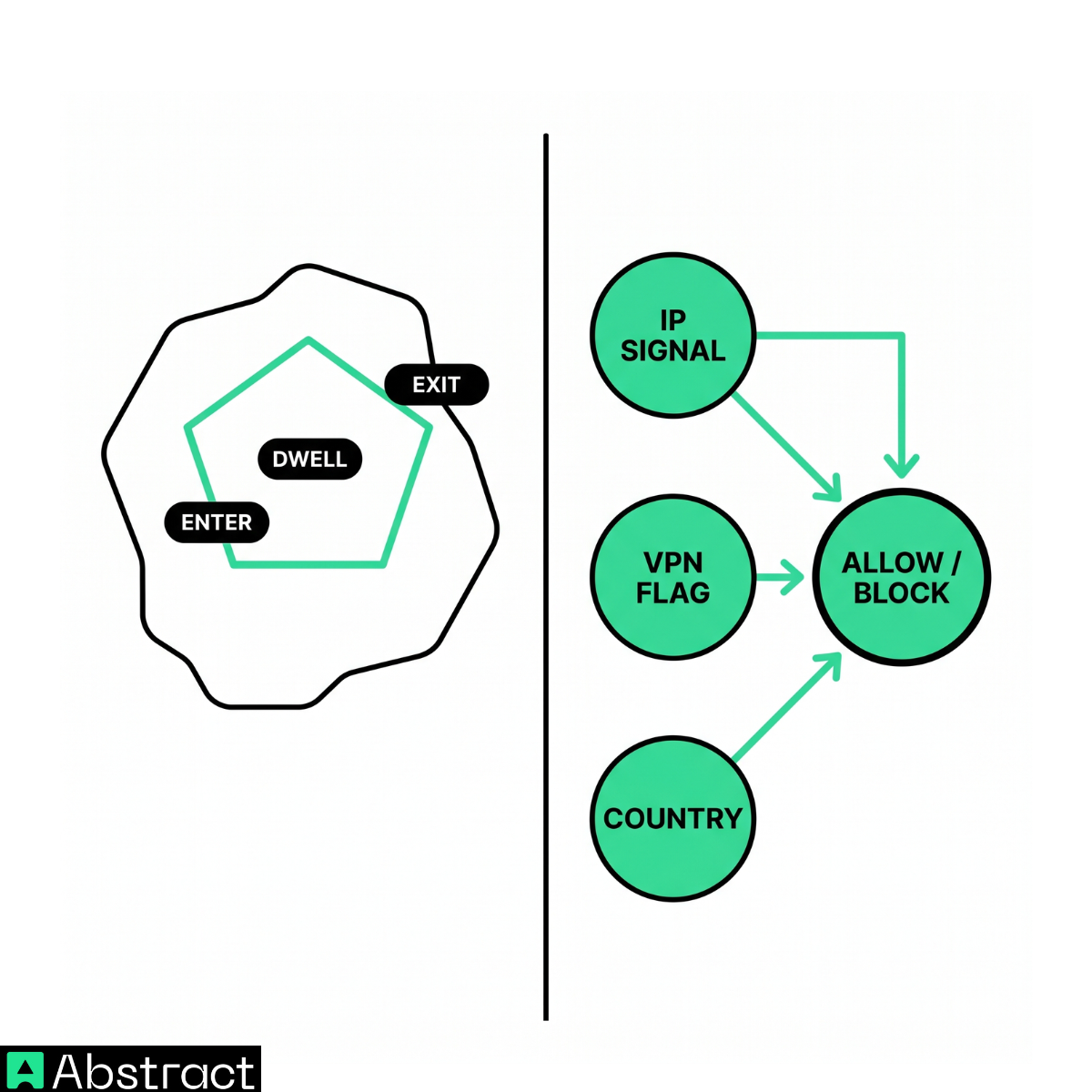
A geofence is usually one of two shapes: a radius around a point (a circle with a 500-meter radius around a stadium) or a polygon tracing a real boundary (a country border, a city limit, a specific block). Both are fast to evaluate at runtime. The computation is simple point-in-polygon math; the harder problem is defining sensible boundaries in the first place.
3. You need a trigger.
Most geofencing platforms support three trigger types:
- Enter. Fires when a user crosses into the boundary. Used for login geo-blocking, content licensing checks, and security alerts.
- Exit. Fires when a user crosses out. Used for session invalidation and delivery confirmation.
- Dwell. Fires after the user has been inside the boundary for a set period. Used for retail loyalty programs and physical attendance verification.
For most developer-facing use cases, enter triggers on IP signal cover the majority of scenarios.
When IP-based geofencing is the right choice
GPS is more accurate, but IP-based geofencing is the right tool for a large class of problems.
- Compliance and content licensing. If your platform distributes licensed content (streaming, sports, gambling, financial data), the user's legal jurisdiction is what determines whether they can access it. That jurisdiction is tied to their IP address, not their GPS coordinates. A user physically in Germany but routing through a US VPN is still, from a licensing standpoint, a German user. You're enforcing the law of where their traffic originates, not where their body is sitting.
A sports streaming platform, for example, can't show a Premier League match to users in the UK because the UK broadcast rights belong to a different licensee. The platform's server needs to check the requesting IP, resolve it to a country, and block or redirect before serving a single frame. GPS coordinates from the user's phone are irrelevant to that check and would require a permission prompt the user never agreed to grant a streaming service.
- Pre-permission filtering. If your app eventually needs GPS permission, use IP geofencing as a first pass before triggering the permission prompt. A user in a country where your app isn't available should never see the GPS permission dialog. The permission ask costs attention and trust; don't spend it on users you'll block anyway.
Consider a mobile app that's only available in the US, Canada, and the UK. When a user in Brazil opens the app for the first time, you can resolve their IP server-side, determine they're outside your supported regions, and show a "not available in your region" screen before ever asking for location access. The GPS permission dialog never fires, and you haven't wasted an impression on a user you can't serve.
- Server-side enforcement. GPS signals come from the client. A motivated user can spoof GPS coordinates through developer tools or mock location apps. IP-based checks run on your server before any response leaves. Bypassing them requires routing traffic through a VPN or proxy, which is visible and detectable (more on that below).
This matters most for fraud and abuse prevention. A user spoofing GPS to appear inside an allowed region can still be caught at the IP layer if their actual traffic is originating from a restricted country or datacenter.
- Trade-offs to acknowledge. IP geofencing is accurate to the city level in most cases, but mobile users can resolve to their carrier's regional hub rather than their actual city. A user on a major US carrier in rural Montana might resolve to an IP registered in Minneapolis. If you're building sub-city geofences (neighborhood-level targeting, specific venue detection), GPS is the right signal. IP geofencing is the right choice for country-level and region-level enforcement, which covers the vast majority of compliance and security use cases.
VPNs, proxies, and the hardest part
A geofence with no VPN detection is a boundary you're asking users to walk around.
A user in a geo-restricted country opens a VPN, connects to a server in an allowed country, and your geofence sees an IP address from a permitted region. The fence holds the line for casual users and fails against anyone who knows VPNs exist, which is most of your technically-aware users and all of your adversarial ones.
VPN and proxy detection is the other half of the job.
What you're looking for:
- Datacenter IPs. Consumer ISPs assign IP ranges to residential customers. Datacenter IP ranges (AWS, Google Cloud, DigitalOcean, and others) are catalogued and reliable to flag. A user with a datacenter IP is almost certainly using a VPN, proxy, or running automated traffic.
- Tor exit nodes. The Tor network's exit node IP addresses are publicly catalogued and updated frequently. Flagging them is straightforward.
- Known VPN providers. Most commercial VPN services use a set of IP ranges that can be identified by ASN (Autonomous System Number) or by cross-referencing known provider infrastructure.
- Residential proxies. The harder problem. Residential proxy networks route traffic through real consumer IPs, often on devices whose owners don't know they're part of a proxy pool. A user in Germany can pay a residential proxy service to route their requests through a home internet connection in the US. The IP that reaches your server is a real residential address registered to a real ISP in an allowed country. It passes every basic geolocation check. Detection requires behavioral signals (request volume, session patterns, header anomalies) and network reputation data, not just IP classification. For a detailed breakdown of how residential proxy detection works and what signals are most reliable, see our guide to detecting residential proxies.
False positives and risk scoring. Binary blocking ("VPN detected = block") breaks legitimate users. Corporate employees route through VPNs as a matter of policy. A software engineer in London using their company's US-based VPN isn't trying to bypass your geofence; they just need access to internal tools. Risk scoring handles this better: combine the VPN flag with the mismatch between detected country and the user's account region, session behavior, and prior access patterns. Block high-risk combinations; challenge medium-risk ones; pass low-risk ones through.
A reference implementation
Here's an Express middleware example that calls Abstract IP Intelligence on every request, checks country and VPN flag, and either continues or returns a 403.
const express = require('express');
const NodeCache = require('node-cache');
const app = express();
const cache = new NodeCache({ stdTTL: 300 }); // cache results for 5 minutes
const ALLOWED_COUNTRIES = ['US', 'CA', 'GB'];
const ABSTRACT_API_KEY = process.env.ABSTRACT_API_KEY;
async function getIPIntelligence(ip) {
const cached = cache.get(ip);
if (cached) return cached;
const res = await fetch(
`https://ipgeolocation.abstractapi.com/v1/?api_key=${ABSTRACT_API_KEY}&ip_address=${ip}`
);
const data = await res.json();
cache.set(ip, data);
return data;
}
async function geofenceMiddleware(req, res, next) {
const ip = req.headers['x-forwarded-for']?.split(',')[0] || req.socket.remoteAddress;
try {
const intel = await getIPIntelligence(ip);
const country = intel.country_code;
const isVPN = intel.security?.is_vpn || intel.security?.is_proxy;
if (!ALLOWED_COUNTRIES.includes(country) || isVPN) {
return res.status(403).json({ error: 'Access restricted in your region.' });
}
next();
} catch (err) {
// fail open: don't block users if the lookup fails
next();
}
}
app.use(geofenceMiddleware);
A few notes on this implementation:
- Caching. The same IP address rarely needs to be looked up more than once per session. A 5-minute in-memory cache (or Redis for distributed environments) reduces latency and keeps your request usage down. Abstract IP Intelligence returns geolocation and VPN/proxy detection in a single response, so you're not paying for two separate lookups.
- Fail open. If the IP lookup fails (network error, timeout), the middleware calls next() rather than blocking the user. The right failure behavior depends on your risk tolerance: content licensing enforcement might call for fail closed; a soft geo-personalization feature should fail open.
- The VPN flag as a signal, not a verdict. The example above blocks VPN users outright. For production, consider logging the flag and applying risk scoring before blocking. See the section above on false positives.
For a comparison of IP Intelligence providers and a deeper look at geofencing-specific features, see the best geofencing APIs compared.
h2 Geofencing is a stack, not a toggle
The mental model most people start with is a switch: geofencing on means a location check happens, geofencing off means it doesn't. Production geofencing is a three-part stack: a location signal, a boundary check, and a VPN/proxy detection layer. Leave out the third layer and the first two are decorative.
IP geofencing covers country-level and region-level enforcement without requiring GPS permissions. It runs server-side, which makes it harder to spoof than client-side GPS. And when you layer VPN and proxy detection on top, you get a system that holds for both casual users and motivated ones.
The failure mode worth avoiding is building the first two layers and shipping. A geofence that blocks unmodified traffic but passes VPN traffic creates a false sense of enforcement. Your compliance team thinks the restriction is in place. Your legal exposure hasn't changed.
The reference implementation above is a starting point, not a finished system. Before moving to production, you'll want to add risk scoring (rather than binary blocking), logging for flagged requests, and a graceful degradation path for the false positives covered in the section above.
Abstract IP Intelligence returns geolocation data, VPN detection, proxy detection, and Tor exit node flags in a single request, so you're resolving the full picture in one round trip. You don't need a separate lookup for each signal, and you're not stitching together multiple providers.
