


What Does Cloudflare IP Geolocation Do?
Cloudflare IP geolocation captures the country code of your website visitors. So, you can determine their country of origin if you enable IP geolocation. You can use the information for a variety of purposes. For example, you can offer discounts only to the customers of a specific country.
It is very easy to use. All you have to do is enable the IP geolocation feature in Cloudflare. It will geolocate your website visitors and pass the country code in ISO 3166-1 Alpha 2 format.
How To Detect A Visitor's Country Of Origin With Cloudflare
So, you might be asking yourself, how does Cloudflare geolocate visitors? First, you have to go to the Cloudflare Dashboard. Then you have to find and activate the IP Geolocation option under the Network app.
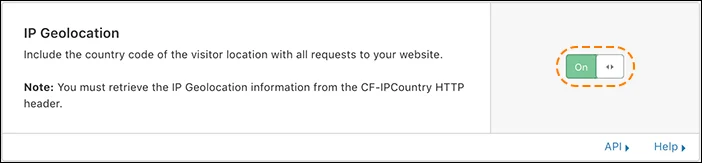
Now, you can start capturing IP geolocation data from analyzed IP addresses.
Capturing IP Geolocation Data
Cloudflare supports a variety of languages and frameworks, including PHP, Python, C# NodeJS, and .NET. You can use it in your web application logic and capture the IP geolocation data effortlessly.
How can you get the visitor's country of origin? The country code value is passed along in the CF-IPCountry request header to the origin web server. You can capture Cloudflare headers into a variable. Later, you can use it to identify the user's country of origin. Keep in mind that even Cloudflare can't go around the anonymity that comes with users on the Tor network. Here are some examples:
PHP
For web applications or websites written in PHP, you need to use this code to capture the country code using the cf ipcountry header:
$country_code = $_SERVER["HTTP_CF_IPCOUNTRY"];
Read: How to geolocate an IP address in PHP
Python
For your Python web application, you need to add this line:
country_code = request.headers.get('cf-ipcountry')
Read: How to geolocate an IP address in Python
NodeJS
For NodeJS applications, you have to use this code:
const country_code = headers['cf-ipcountry'];
C#.Net
For C#.NET web applications, you have to add this line:
string country_code = HttpContext.Current.Request.Headers.Get("cf-ipcountry");
Alternatives to Using Cloudflare IP Geolocation
Is there any easier solution for detecting a user's country or to find the IP geolocation information? You can try using Abstract's Geolocation API. It allows you to get geolocation data, including country codes, region, continent, city, and postal code, effortlessly. You just need to make an API request with the API access key and IP address.
Let's take a look at a practical example. How about detecting the geolocation data of this IP address: 92.184.105.98
Let's make an API request.
https://ipgeolocation.abstractapi.com/v1/
  ? api_key = YOUR_UNIQUE_API_KEY
  & ip_address = 92.184.105.98
You will get this response:
{
  "ip": 92.184.105.98,
  "city": "Caen",
  "city_geoname_id": 3029241,
  "region": "Normandie",
  "region_iso_code": "FR-NOR",
  "region_geoname_id": 11071621,
  "postal_code": "14949",
  "country": "France",
  "country_code": "FR",
  "country_geoname_id": 3017382,
  "country_is_eu": true,
  "continent": "Europe",
  "continent_code": "EU",
  "continent_geoname_id": 6255148,
  "longitude": 49.242341,
  "latitude": -0.352637,
  "timezone": {
    "name": "Central European Time",
    "abbreviation": "CET",
    "gmt_offset": "+1",
    "current_time": "2020-03-29T07:35:08-07:00",
    "is_dst": true
  },
  "flag": {
    "emoji": "🇫🇷",
    "unicode": "U+1F1EB U+1F1F7",
    "svg": "https://static.abstractapi.com/country-flags/fr_flag.svg",
    "png": "https://static.abstractapi.com/country-flags/fr_flag.png"
  },
  "connection": {
    "autonomous_system_number": "AS3215",
    "autonomous_system_organization": "France Telecom - Orange, FR",
    "connection_type": "wireless",
    "isp_name": "Orange S.A.",
    "organization_name": "Internet OM"
  }
}
As you can see, the value of the country field is set to France. That means the user's country of origin is France. Also, it has returned several key information, including timezone, continent, and city. By using this data, you can provide a personalized experience to the users effectively.
Abstract's IP geolocation API is easier to use and is one of the best IP geolocation APIs. It doesn't require you to write any code from scratch. Also, you don't need to activate any feature, like IP Geolocation. You just need to make a request with the API key and the IP address. So, there is no hassle.
Wrapping Up Cloudflare IP Geolocation
That's how you use Cloudflare IP geolocation to detect the country of a user. As you can see, the process is very simple. There is no hassle. So, you can utilize it to uncover key insights effortlessly.
Abstract's geolocation API enables you to detect geolocation data of visitors to your website effortlessly. Try it now for free.
Cloudflare Geolocation FAQs
How accurate is Cloudflare IP Geolocation?
Just like any other IP geolocation service, Cloudflare IP geolocation has some limitations with accuracy. For example, users can use a variety of services, like VPN, to mask their real IP. As a result, it cannot identify the location accurately. Also, it cannot identify cities and regions with 100% accuracy.
If you focus heavily on data accuracy, you can consider using an alternate solution, like Abstract's IP Geolocation API. It is constantly updated to improve the accuracy of geolocation data. Also, it is easier to use. All you have to do is make a request with the API key and the IP address. You will get all the necessary info, including country data, region, and city, instantly.
How Do I Find The Geolocation of An Ip Address?
You can find the geolocation of an IP address by using Cloudflare IP Geolocation. Alternatively, you can use Abstract's IP Geolocation API. It allows you to get the geolocation data quickly. Also, it is easier to use.
Does IP Address Show Geolocation?
The IP address can show your geolocation, such as city and area code. However, it cannot reveal your precise location, like your home address.
Frequently Asked Questions
What is Cloudflare IP geolocation and how does it work?
Cloudflare IP geolocation is a feature that adds a CF-IPCountry header to every incoming request, containing the visitor's country code in ISO 3166-1 Alpha-2 format. When enabled in the Cloudflare dashboard under Network settings, Cloudflare resolves the visitor's IP address against its geolocation database (powered by IPinfo) and injects the result before forwarding the request to your origin server. Your server can then read that header to identify where the visitor is connecting from.
How do you enable Cloudflare IP geolocation?
Log in to the Cloudflare dashboard, select your domain, and navigate to the Network settings section. Toggle the IP Geolocation option to On. Once enabled, the CF-IPCountry header will automatically be included on all proxied requests to your origin. You can also enable it programmatically via the Cloudflare API by sending a PATCH request with ip_geolocation as the setting name and its value set to "on".
How do you read the CF-IPCountry header in PHP, Python, and Node.js?
Each language exposes request headers differently. In PHP use $_SERVER["HTTP_CF_IPCOUNTRY"]; in Python (Flask/Django) use request.headers.get('cf-ipcountry'); in Node.js read req.headers['cf-ipcountry']; and in C#.NET call HttpContext.Current.Request.Headers.Get("CF-IPCountry"). The returned value is a two-letter country code such as US or DE.
What are the limitations of Cloudflare's built-in IP geolocation?
Cloudflare IP geolocation only provides the visitor's country; it does not return city, region, timezone, or other granular location data. Accuracy is also reduced when visitors use VPNs, since the resolved location reflects the VPN exit node rather than the user's real location. Traffic routed through the Tor network cannot be geolocated at all, and Cloudflare will return a placeholder value in those cases.
When should you use a dedicated IP geolocation API instead of Cloudflare's header?
Cloudflare's CF-IPCountry header is a good fit when you only need the visitor's country and your site is already proxied through Cloudflare. If you need richer data (city, region, postal code, timezone, ISP, or connection type), a dedicated IP geolocation API like Abstract's returns all of that from a single request without requiring Cloudflare in your stack. A dedicated API is also necessary when geolocating arbitrary IP addresses server-side rather than just the current visitor's IP.
How accurate is Cloudflare IP geolocation?
Cloudflare sources its geolocation data from IPinfo and updates the database multiple times per week, making country-level accuracy generally reliable for residential and business connections. Accuracy drops for mobile carrier IPs, corporate proxies, and VPN exit nodes, which may resolve to the wrong country. If you discover an incorrect mapping, Cloudflare provides a data correction form where you can submit the affected IP range and the correct location.
