


✅ The 7-Point Inspection — How to Tell if an Email is Fake
Below is a simple yet powerful checklist anyone can use when analyzing a suspicious message.
1. Inspect the Sender's Email Address Carefully
Don't trust the display name—the real sender is hidden in the email address. Watch for:
- Impersonation using generic domains
support@paypal.com@gmail.com 🚩
- Slight domain manipulations
amaz0n.co → fake
rnicrosoft.com (rn instead of m) → fake
Tip: Hover over the sender or tap for details on mobile to reveal the full email origin.
2. Watch for Unusual Tone or Language
Professional organizations use consistent formatting and clean grammar. Red flags include:
- Emotionally charged language ("account suspended", "final warning")
- Strange tone shifts—too formal or overly casual
- Slight grammatical errors typical of AI-generated scams
3. Hover Before You Click Any Links
Links are phishing traps 🪤. Before clicking, hover (desktop) or long press (mobile) to preview:
- Mismatched domain links
https://paypal.com → OK
https://paypa1-security.com/login → ❌ Fake
- Suspicious redirects or tracking URLs
Learn more about safe verification in our guide:
4. Treat Attachments as Dangerous by Default
Malware is often disguised as invoices or resumes:
- .exe, .js, .scr, .zip attachments → Dangerous
- Unrequested documents (e.g. "Invoice #4598") → Be cautious
5. Beware of Generic Greetings
Fake emails often start with plain greetings:
- "Dear Customer,"
- "Dear User,"
- "To Whom It May Concern"
Real companies usually address you by name.
6. Never Share Personal Information via Email
Legitimate organizations never ask for:
- Passwords 🔑
- Bank PINs 💳
- Scans of IDs or passports 🛂
7. Check Branding Details
Even if the sender uses real logos, scammers often miss:
- Consistent branding or colors
- Proper alignment and formatting
- Updated logos or legal footer text
🔧 Technical Verification — How to Check if an Email Address Is Real
Time for definitive confirmation methods used by developers, security teams, and SaaS businesses.
✅ Method 1: Use an Email Verification API (Fast + Reliable)
Email verification APIs check if an email exists—without sending a message.
These tools:
- Validate syntax
- Confirm MX and DNS configuration
- Safely ping email servers
- Detect disposable or fake email providers
🔐 Best for: Sign-up forms, CRM cleaning, fraud prevention
✅ Try this free tool: AbstractAPI Email Verification API
It can also detect temporary emails—a common problem in fake registrations. See how it supports anti-fraud systems in: 🔗 How to Prevent Fake Signups With APIs
📬 Method 2: Double Opt-In Confirmation
A classic but effective method:
- User signs up
- They receive a confirmation link
- The account activates once the link is clicked ✅
This confirms that:
- The email address is valid
- The user owns the inbox
- Typos don't ruin registration flows
🛡️ Method 3: Check SPF, DKIM & DMARC Authentication
Authentication records help prevent email spoofing:
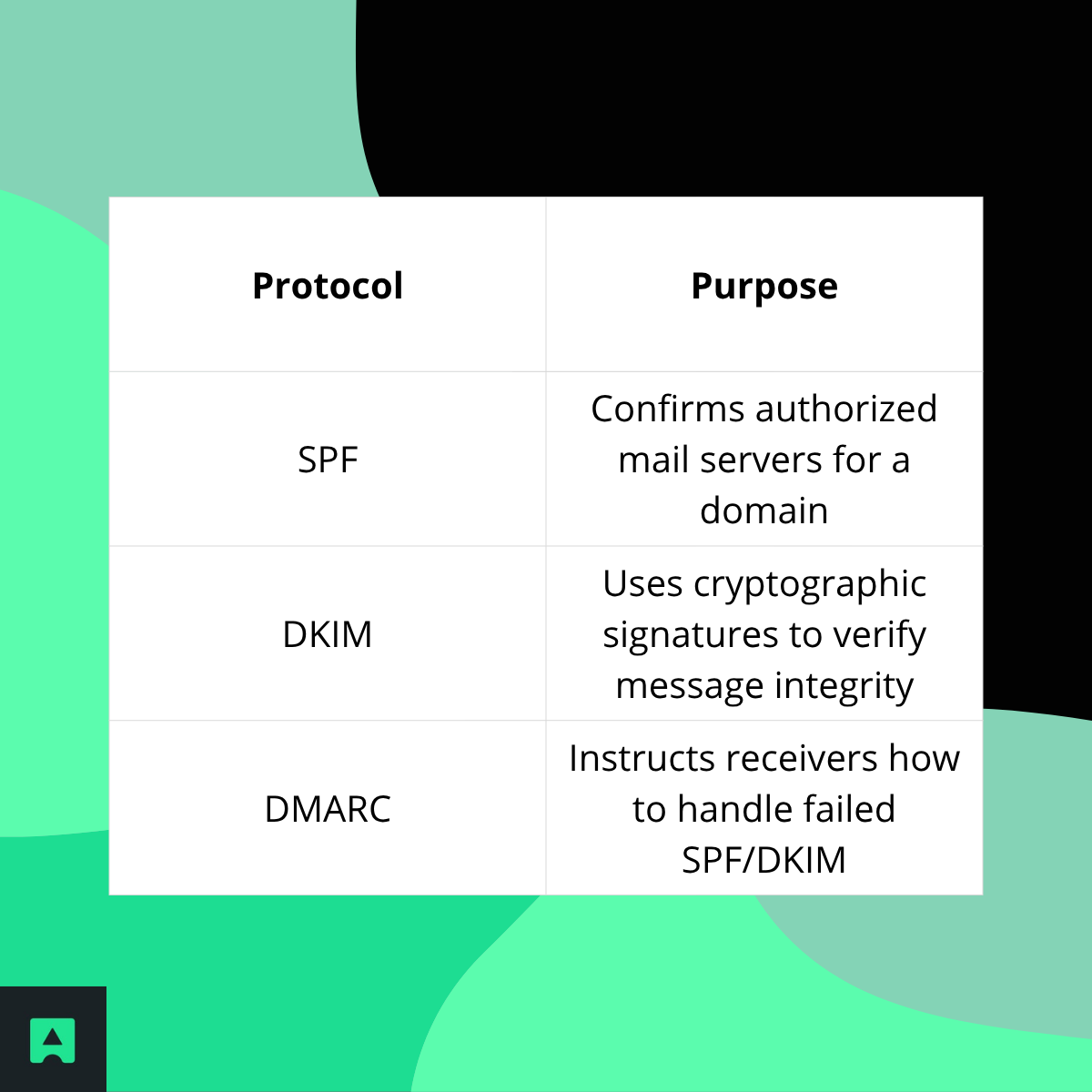
You can inspect these in the headers of a suspicious email.
🕵️ The Investigation — Trace a Fake Email and Find Its Owner
🔎 Part 1: Can You Trace a Fake Email?
Absolutely. Start with the email header. It reveals:
- The sender's IP (sometimes hidden by Gmail/Outlook)
- The path it traveled through mail servers
- Authentication status
To view headers:
- Gmail → More → Show Original
- Outlook → File → Properties
- Apple Mail → View → All Headers
Then use an Email Header Analyzer to decode it.
Want to deepen email security? Read:
🧭 Part 2: 8 Ways to Discover Who Owns an Email
Here's a practical investigation framework:

✅ Final Thoughts — Build Stronger Email Defenses Today
Fake emails are now nearly indistinguishable from real ones—trusting your inbox blindly is risky. But now you have a layered strategy to stay safe:
✅ Inspect manually — look for warning signs
✅ Verify technically — confirm mailbox authenticity
✅ Investigate when needed — trace suspicious senders
If you're developing a web app, online marketplace, or subscription platform, don't let fake emails into your system in the first place.
🔒 Protect your signup forms and user database with real-time validation:
👉 Try AbstractAPI's Email Validation API
You may also like:
🔗 REST API Tutorial for Beginners
Frequently Asked Questions
What is the most reliable way to verify whether an email address is fake?
The most reliable approach combines syntax checks, MX record lookups, and SMTP validation, all of which an email verification API handles automatically. Checking authentication records (SPF, DKIM, and DMARC) on the sending domain adds another layer of confidence. Relying on any single signal, such as format alone, misses a large share of fake addresses that look syntactically correct.
How can I tell if an email is spoofed just by looking at the sender address?
Spoofed addresses typically use subtle domain manipulation: swapping characters, adding hyphens, or using lookalike TLDs (for example, "amaz0n.co" instead of "amazon.com"). Always inspect the full address, not just the display name, since scammers can set a trusted-looking display name while the actual domain is completely unrelated. Hovering over links in the email to see their true destination is a quick secondary check.
How do I read email headers to trace a fake or spoofed email?
Email headers contain the true routing path of a message, including the originating IP and each mail server the message passed through. In Gmail, open the message, click the three-dot menu, and select "Show original"; Outlook and Apple Mail have similar "View source" or "All headers" options. Work through the "Received" fields from bottom to top — the earliest entry reveals where the message actually originated, which often contradicts the displayed sender.
What are SPF, DKIM, and DMARC, and why do they matter for detecting fake emails?
SPF (Sender Policy Framework) specifies which mail servers are authorized to send on behalf of a domain; DKIM adds a cryptographic signature to each message so recipients can verify it was not tampered with; DMARC ties both together and tells receiving servers what to do when a message fails either check. A message that fails all three is a strong signal of spoofing or forgery. Most major email clients surface these pass/fail results in the message headers or security detail panel.
When should I use an email verification API instead of manual checks?
Manual inspection works for evaluating individual suspicious messages, but it does not scale to sign-up forms, CRM imports, or marketing lists with thousands of addresses. An email verification API validates syntax, MX records, and SMTP deliverability in real time and can also flag disposable or role-based addresses that are often used to obscure identity. Integrating API-level validation at the point of data entry prevents fake addresses from entering your system in the first place.
What is a disposable email address and how is it different from a spoofed email?
A disposable email address is a temporary inbox (such as those from Mailinator or Guerrilla Mail) that a real person creates specifically to avoid giving out their actual address — it is not necessarily malicious, but it signals low intent or an attempt to circumvent verification. A spoofed email, by contrast, forges the sender identity to impersonate a trusted source and is used in phishing and fraud. Both can be caught during validation: disposable addresses are identified by matching against known provider domains, while spoofed senders are revealed through header analysis and authentication record checks.
