


The HTTP Status Code 422 means that request was well-formed but was unable to be followed due to semantic errors.
What Is HTTP Status Code 422? The Modern Standard for API Validation
The 422 status code, officially known as HTTP 422 Unprocessable Entity, is now the global standard for validation errors in modern APIs. In 2026, this status code plays a critical role in REST and GraphQL systems, especially as AI agents increasingly interact with APIs autonomously.
In the past, many APIs returned generic 400 Bad Request responses when validation failed. But today, that approach is considered obsolete. Generic errors don't provide enough detail for automated systems to recover. Modern APIs instead use the 422 error code with structured, machine-readable responses, following RFC 9457, the latest IETF standard for API error formats.
This allows frontend applications, integrations, and AI agents to immediately identify which field is invalid, why it failed, and how to fix it — automatically.
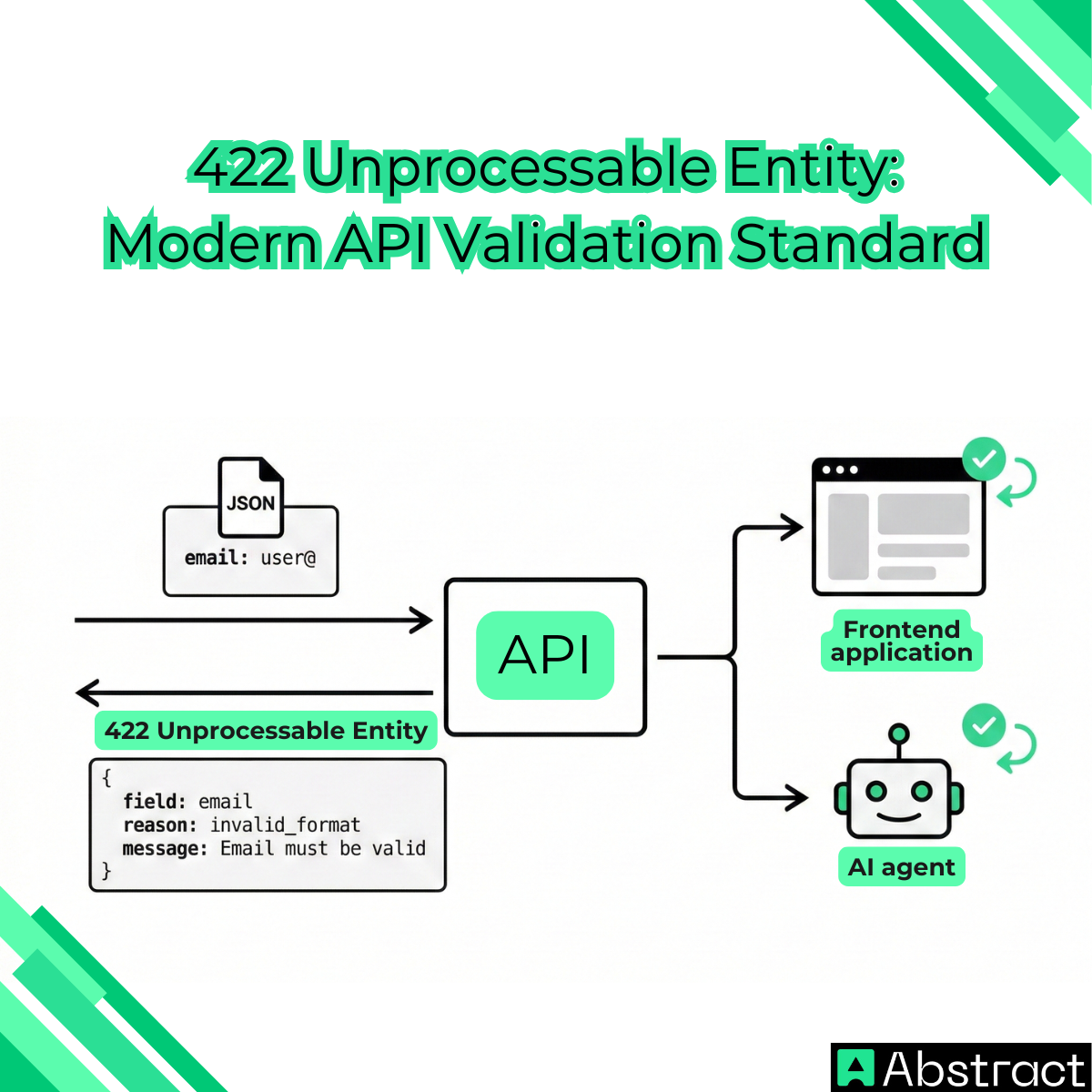
What Is the 422 Status Code?
The 422 status code means the server understands the request, but cannot process it because the data is semantically invalid.
In simple terms:
- The syntax is correct
- The format is readable
- But the data itself is invalid
This is why it is called an unprocessable entity.
Example / Valid JSON syntax:
{
"email": "user@"
}
Invalid semantic meaning:
The email format is incorrect.
Response: HTTP/1.1 422 Unprocessable Entity
The server is saying:
- "I understand your request, but the data is invalid."
Although HTTP 422 was originally introduced in WebDAV, it is now the de-facto standard for validation errors across REST and GraphQL APIs.
422 vs 400 Bad Request: What's the Difference?
Understanding the difference between 422 vs 400 bad request is essential for proper API design.
The key distinction is:
- 400 Bad Request = Syntax error
- 422 Unprocessable Entity = Validation error
HTTP 400 Bad Request: Syntax Error
This means the server cannot read the request.
Example:
{
"name": "Claudia"
Missing closing bracket.
Response: 400 Bad Request
Meaning: "I can't parse this."
HTTP 422 Unprocessable Entity: Semantic Error
This means the server understands the request, but the values are invalid.
Example:
{
"age": -5
}
Response: 422 Unprocessable Entity
Meaning: "I understand it, but the data is invalid."
Why the 422 Error Code Is Critical for AI Agents
In 2026, APIs are increasingly consumed by AI agents, automation tools, and autonomous software, not just human users.
These systems rely on precise feedback.
A generic error like: 400 Bad Request
does not explain what went wrong.
AI agents cannot guess what to fix.
But a modern 422 response provides structured validation details, such as:
- Which field failed
- Why it failed
- How to fix it
Example:
"errors": [
{
"field": "email",
"reason": "invalid_format",
"message": "Email must be a valid address."
}
]
This allows AI systems to automatically correct input and retry the request.
This capability is one of the main reasons why the 422 status code has become the gold standard for API validation.
The Modern Standard: RFC 9457 and application/problem+json
Modern APIs should return validation errors using RFC 9457, the official IETF standard for structured error responses.
RFC 9457 builds on RFC 7807 and defines a standardized format using the content type:
application/problem+json
This format ensures errors are readable by:
- Frontend applications
- Mobile apps
- Backend services
- AI agents
and automation systems.
Example of a Modern 422 Response
HTTP/1.1 422 Unprocessable Entity
Content-Type: application/problem+json
{
"type": "https://api.example.com/errors/validation",
"title": "Invalid Input",
"status": 422,
"detail": "The request contains invalid parameters.",
"instance": "/users/signup",
"errors": [
{
"field": "email",
"value": "user@",
"reason": "invalid_format",
"message": "Email must be a valid address."
}
]
}
This structured format allows both humans and machines to immediately resolve validation errors.
Following RFC 9457 is now considered one of the most important API error handling best practices in 2026.
When Should You Use HTTP 422?
You should use the 422 status code whenever validation fails.
Common examples include:
- Invalid email format
- Missing required fields
- Invalid phone numbers
- Invalid numeric values
- Business rule violations
Example:
{
"password": "123"
}
Response: 422 Unprocessable Entity
Reason: Password too short.
Do NOT use 422 for:
- Syntax errors → use 400
- Resource conflicts → use 409
Example of conflict:
- Email already exists.
- This is not invalid — it conflicts.
Correct code: 409 Conflict
Common Causes of 422 Unprocessable Entity
The following table shows the most common causes of the HTTP 422 Unprocessable Entity status code and where they typically occur:
| Cause | Example | Common Where It Happens |
|---|---|---|
| Invalid email address format | user@ instead of user@email.com |
Signup forms, login systems, user registration APIs |
| Invalid phone numbers | Missing country code or invalid number length | Contact forms, SMS verification APIs |
| Missing required fields | Missing password or email field | Account creation endpoints, profile forms |
| Invalid data types | Sending "age": "twenty" instead of "age": 20 |
REST API POST and PUT requests |
| Invalid date formats | Sending 31-02-2026 instead of 2026-02-28 |
Booking systems, scheduling APIs |
| Business logic validation failures | Password too short, username too long | Authentication systems, payment APIs |
| GraphQL mutation validation errors | Invalid input in mutation variables | GraphQL APIs |
| Invalid form submissions | Incorrect or incomplete form data | Frontend forms, profile update endpoints |
422 Error Code Meaning in Postman and How to Fix It
If you see a 422 error code in Postman, it means your request data failed validation.
Fortunately, modern APIs provide detailed feedback.
Step 1: Check the Response Body
Look for validation errors:
{
"errors": [
{
"field": "email",
"message": "Email must be valid"
}
]
}
Step 2: Fix the Invalid Field
Update your request.
Example:
Change: user@
To: user@email.com
Step 3: Send the Request Again
If valid, you should receive: 200 OK Or 201 Created
How Frontend Applications Should Handle 422 Errors
Frontend apps should use validation feedback to guide users.
Example JavaScript handler:
try {
await api.post('/users', userData);
} catch (error) {
if (error.response.status === 422) {
const validationErrors = error.response.data.errors;
validationErrors.forEach(err => {
setFieldError(err.field, err.message);
});
}
}
This allows applications to show precise error messages like: "Email must be valid" instead of generic failures.
This improves user experience significantly.
How to Fix 422 Errors in Your API
If your API frequently returns 422 errors, you should improve validation handling.
Best practices:
- Return structured error responses
- Use RFC 9457 format
- Validate all input fields
- Provide clear error messages
- Use consistent error structures
Prevent 422 Errors with AbstractAPI Validation
If your backend frequently returns the 422 status code, it means invalid data is reaching your system.
A modern best practice is to validate input before processing it.
AbstractAPI provides production-ready validation APIs including:
- Email Validation API
- Phone Validation API
- These APIs allow you to:
- Validate user input in real time
- Detect invalid emails and phone numbers
- Prevent invalid data from reaching your backend
- Reduce validation failures and improve reliability
This helps you build cleaner, more reliable APIs without complex validation logic.
Learn more at: https://www.abstractapi.com
Related Status Codes: HTTP 402 Payment Required and the Agent Economy
Another important status code in modern APIs is HTTP 402 Payment Required.
The 402 payment required meaning is evolving as AI agents begin paying for API access automatically.
This model, often called L402, allows:
- AI agents to pay per API request
- Metered API access
- Automated service usage billing
Example: 402 Payment Required
Meaning: Payment is required before access is granted.
This is becoming an important component of the emerging machine-to-machine economy.
422 vs 409 Conflict: What's the Difference?
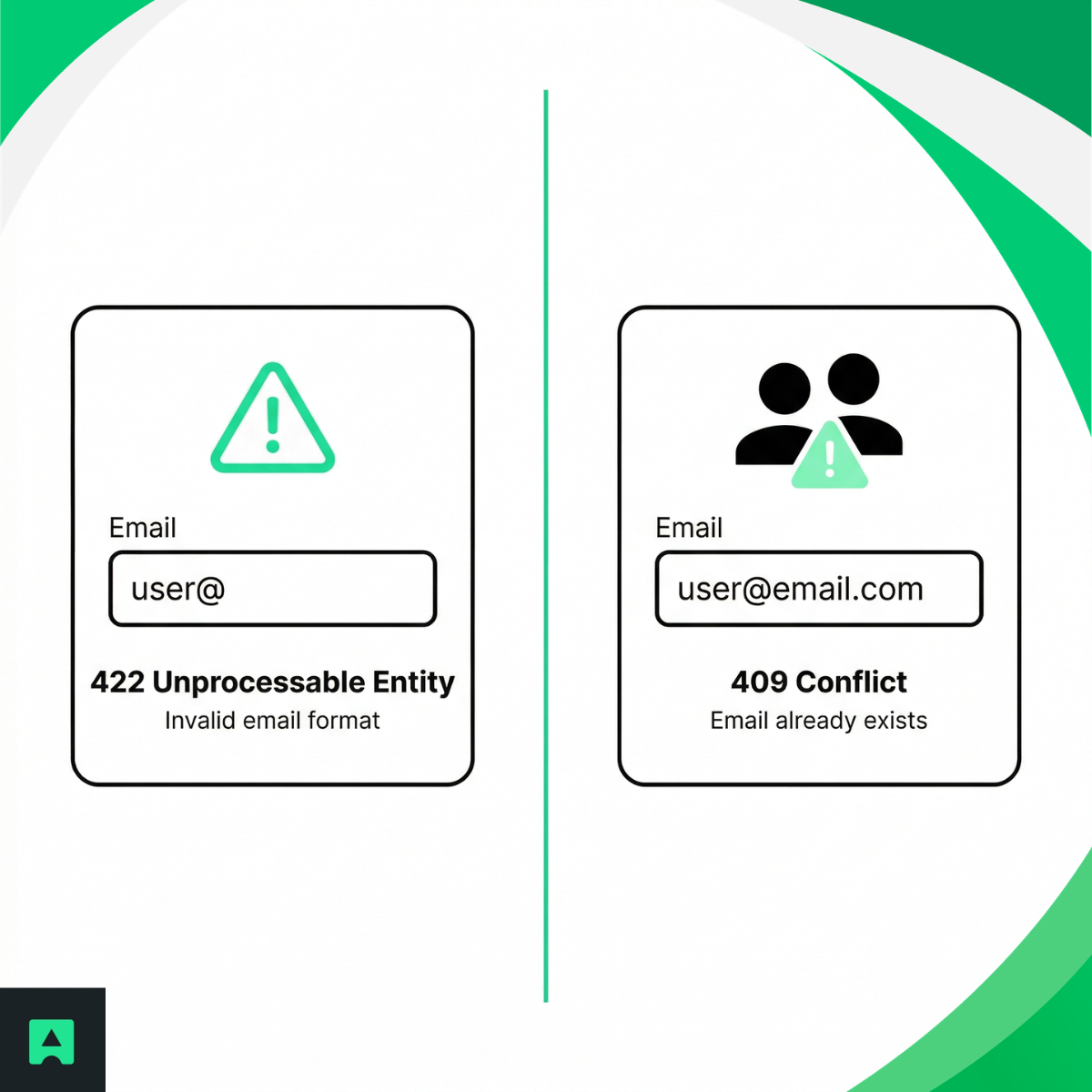
These status codes are often confused. But they mean different things.
422 Unprocessable Entity: Your input is invalid
Example: Invalid email format
409 Conflict: Your input is valid but conflicts with existing data
Example: Email already exists
API Error Handling Best Practices in 2026
Modern APIs should always:
- Use 422 for validation failures
- Use RFC 9457 structured responses
- Provide field-level error details
- Design errors for both humans and AI agents
- Avoid generic error messages
This ensures reliability, automation, and better user experience.
Conclusion
The HTTP 422 Unprocessable Entity status code has become the foundation of modern API validation.
It allows systems to detect, communicate, and fix validation errors efficiently.
With the adoption of RFC 9457 and structured error formats, APIs can now provide precise, machine-readable feedback that supports frontend applications, integrations, and AI agents.
As software becomes increasingly automated, using the 422 status code correctly is essential for building reliable, future-ready APIs.
And by validating input early using tools like AbstractAPI, you can prevent errors entirely and deliver a better developer and user experience.
Frequently Asked Questions
What does HTTP 422 mean?
HTTP 422 Unprocessable Content means the server understood the request and could parse it, but could not process it because the data itself is semantically invalid. In short: the syntax is correct and the format is readable, but the values inside the request break a rule — such as a missing required field, a malformed email address, or a business logic constraint.
When does a server return a 422 status code?
A server returns 422 when request validation fails on the data it received. Common triggers include missing required fields, invalid email or phone number formats, data type mismatches, date format errors, and business logic violations such as a password that is too short. The request reached the server and was parsed successfully — the problem is with the content, not the transmission.
What is the difference between HTTP 422 and 400?
A 400 Bad Request means the server could not parse or process the request — the syntax is broken, the JSON is malformed, or a required header is missing. A 422 means the server read the request without issue but found the data itself to be invalid. When you receive a 400, fix the structure of the request; when you receive a 422, fix the values inside it.
What is the difference between HTTP 422 and 409?
A 422 indicates that the input is invalid on its own — for example, an improperly formatted value. A 409 Conflict means the input is valid but clashes with existing data on the server, such as attempting to register with an email address that is already in use. Use 409 when the problem is a collision with current state, and 422 when the data itself does not pass validation.
How do I fix an HTTP 422 error?
Start by reading the error response body, which well-designed APIs return in a structured format that identifies which field failed and why. Verify that all required fields are present, that values match the expected types and formats, and that your request satisfies any documented business rules. Validating your payload against the API documentation before sending the request prevents most 422 errors.
Why is 422 the preferred status code for validation errors in REST APIs?
HTTP 422 has become the de-facto standard for validation errors across REST and GraphQL APIs because it communicates a precise meaning: the request was understood, but the data is semantically wrong. This distinction matters especially for automated clients and AI agents, which need machine-readable feedback to identify and correct the exact field that failed without human intervention.
