


A 409 status code (Conflict) means the request could not be completed because it conflicts with the current state of the resource. It commonly appears in REST APIs when concurrent updates collide, such as a PUT or PATCH against a version that has since changed, or creating a resource that already exists.
409 vs 412 vs 422
| Code | Meaning |
|---|---|
| 409 Conflict | Request conflicts with the current state of the resource |
| 412 Precondition Failed | A request precondition such as If-Match was not met |
| 422 Unprocessable Entity | Syntax is valid but the content is semantically invalid |
🧩 When Two Edits Collide

Imagine you're editing a shared Google Doc, hit "Save," and suddenly see a warning: "Someone else edited this document while you were working." That's the 409 Conflict error in action — your version and the server's version don't match.
In web terms, a 409 HTTP status code signals a conflict between the client's request and the current state of the resource on the server. It's a client-side error (4xx family) that occurs when the request cannot be completed due to versioning, concurrency, or data constraints.
This guide is designed to be the most comprehensive 409 resource for developers, site administrators, and users alike — explaining what it means, why it happens, and exactly how to fix it.
⚡Quick Troubleshooting for Site Owners & End-Users
Not every 409 conflict requires code-level debugging. Before diving into your server logs or APIs, try these quick fixes:
1. 🔎 Check the URL for Typos or Incorrect Parameters
Sometimes, a malformed URL or trailing slash (/) can cause conflicts by referencing outdated or incorrect resources.
2. 🧹 Clear Your Browser Cache and Cookies
Stale cache data can create mismatched requests.
- Chrome: Settings → Privacy → Clear browsing data
- Firefox: History → Clear Recent History
- Safari: Preferences → Privacy → Manage Website Data → Remove All
Clearing cache ensures you're not sending old session data or ETags.
3. 🧩 Disable Browser Extensions
Extensions (like ad blockers or password managers) can modify HTTP headers or cached data, leading to unexpected conflicts. Try disabling them temporarily and refreshing the page.
4. 🔄 Roll Back CMS Plugin or Theme Updates
If you're running a CMS such as WordPress, plugin or theme updates can modify database structures or API calls, triggering 409 conflicts. Try deactivating the latest update or restoring from backup.
🔍 What Is the 409 Conflict Error? A Technical Deep Dive
According to RFC 9110 (Section 15.5.10),
- "The 409 (Conflict) status code indicates that the request could not be completed due to a conflict with the current state of the target resource."
It's most often associated with PUT requests, where the client tries to update a resource that has been modified since it was last retrieved.
Example HTTP Request/Response Cycle
PUT /api/users/123 HTTP/1.1
Host: api.example.com
Content-Type: application/json
If-Match: "etag-abc123"
{
"email": "john@example.com"
}
Server Response:
HTTP/1.1 409 Conflict
Content-Type: application/json
{
"error": "Conflict",
"message": "The resource has been modified since your last update. Fetch the latest version before retrying."
}
- The If-Match header ensures that updates only apply if the client's version matches the server's ETag.
⚙️ Common Causes of the 409 Error (with Real-World Examples)
Let's categorize the most frequent reasons why a 409 appears — and how to fix them.

🧾 1. Data Integrity Conflicts
What happens: The request violates a database constraint (e.g., unique keys or foreign key relationships).
Example: Trying to create a new user in Auth0 with an email that already exists results in a 409 conflict.
Fix:
- Validate data before submission and return clear error messages to the user.
{
"error": "Conflict",
"message": "User with this email already exists."
}
🗂️ 2. Version Control Conflicts
What happens: Two clients attempt to modify the same resource concurrently.
Example: In a CMS, two authors save edits to the same article at the same time. The second save triggers a 409 because the resource's version has changed.
Fix:
- Implement version tracking (via ETags or timestamps) and prevent overwriting unless explicitly confirmed.
🔒 3. Concurrent Access Issues
What happens: Multiple threads or APIs modify the same record simultaneously.
Example: Two checkout requests reduce the same inventory item's stock, resulting in inconsistent data.
Fix:
- Use optimistic or pessimistic locking mechanisms:
# Python SQLAlchemy example
session.query(Product).filter_by(id=10).with_for_update().one()
⚙️ 4. Server Configuration or Naming Conflicts
What happens: The server's configuration rejects specific names or routes.
Example: As discussed on Stack Overflow, SharePoint blocks reserved folder names like contact or forms, causing 409 errors.
Fix:
- Rename restricted directories or modify your server rules (e.g., NGINX or Apache configurations).
🧰 Advanced Solutions for Developers
409 errors are preventable — here's how to handle them proactively and gracefully.
1. ✅ Conditional Requests with ETags
ETags help synchronize updates and prevent overwriting.
JavaScript Example:
fetch('/api/resource/1', {
method: 'PUT',
headers: {
'If-Match': '"etag-123"',
'Content-Type': 'application/json'
},
body: JSON.stringify({ name: 'Updated Resource' })
});
2. 🧱 Implement Locking Strategies
Optimistic Locking assumes no conflicts — it verifies version consistency at save time.
Pessimistic Locking prevents concurrent modifications by locking records during edits.
Java Example:
@Transactional
public void updateUser(User user) {
entityManager.lock(user, LockModeType.PESSIMISTIC_WRITE);
// update logic
}
3. 💬 Handle 409 Errors Gracefully
Instead of failing silently, display clear feedback to the user or client.
Python Example:
response = requests.put(url, data=payload)
if response.status_code == 409:
print("Conflict: The resource has changed. Please refresh and try again.")
These strategies align with AbstractAPI's commitment to robust, developer-friendly API design. To maintain clean, validated data, you can also integrate AbstractAPI's Email Verification API or Phone Number Validation API.
🧭 How to Diagnose 409 Errors on Your Server
1. 🔍 Check Server Logs
Search for 409 entries in your access logs:
[22/Oct/2025:14:35:21 +0000] "PUT /api/users/123 HTTP/1.1" 409 -
Note the timestamps, request method, and resource path to identify patterns.
2. 🧠 Use APM or Hosting Tools
Application Performance Monitoring (APM) tools such as New Relic, Datadog, or your hosting dashboard (like MyKinsta or SiteGround Site Tools) can pinpoint which endpoints or database calls caused conflicts.
Monitoring concurrent requests can reveal timing-related or state mismatch issues.
⚖️ 409 Conflict vs. Other HTTP Status Codes
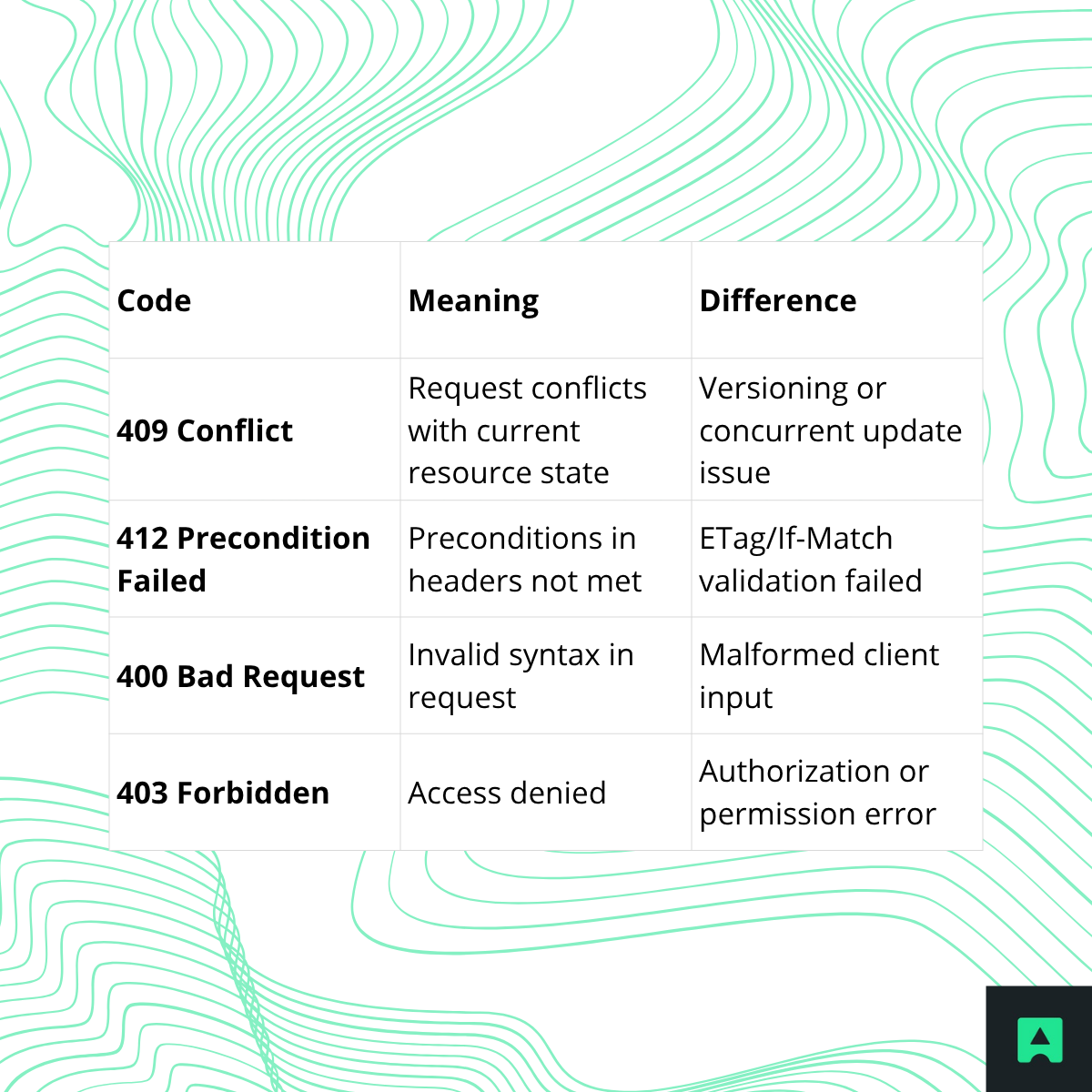
For more on HTTP codes, visit the Complete HTTP Status Codes Guide.
📈 SEO Impact of a 409 Error
While a 409 won't directly affect rankings, persistent conflicts can hurt crawlability and content freshness:
- 🕷️ Crawlers may fail to update pages if resources remain in conflict.
- 🧭 Stale data can signal poor maintenance to search engines.
- 👥 User experience suffers if visitors encounter failed updates or broken submissions.
Maintaining consistent data flow and API stability helps preserve both site reliability and SEO performance.
🧩 Conclusion: Conflict Isn't Failure
A 409 Conflict doesn't mean your server is broken — it's a coordination problem between client and server states.
By understanding how version mismatches, concurrency, and configuration errors cause this issue, and applying conditional requests or locking strategies, you can prevent 409s before they occur.
Whether you're debugging a WordPress plugin or refining a RESTful API, use this guide to confidently resolve and prevent 409 conflicts — and keep your systems perfectly in sync 🚀
Related Reading:
- What Is an HTTP 404 Not Found Error?
- Understanding the 500 Internal Server Error
- Full HTTP Status Codes Overview
Frequently Asked Questions
What does HTTP 409 mean?
HTTP 409 Conflict is a client-side error status code indicating that a request could not be completed due to a conflict with the current state of the target resource. Unlike a 404 (resource not found) or a 500 (server failure), a 409 specifically signals a state mismatch between what the client sent and what the server currently holds. The server is reachable and understood the request — it just cannot process it as-is without a conflict being resolved first.
When does a server return a 409 status code?
A server returns 409 when a request would violate the current state of a resource. Common triggers include attempting to create a resource with a duplicate unique identifier (such as registering an email address that already exists), two clients concurrently modifying the same record, or a version mismatch where the client is working from a stale copy of the data. It also appears in CMS environments when multiple authors try to save conflicting edits to the same content at the same time.
How do I fix a 409 Conflict error?
The fix depends on the root cause. For end users, clearing browser cache and cookies or refreshing the page to fetch the latest resource state often resolves the issue. For developers, the recommended approach is to use conditional request headers such as If-Match with an ETag value so the server can reject stale writes before a conflict occurs. Implementing optimistic or pessimistic locking strategies also prevents concurrent modification issues at the application layer.
What is the difference between a 409 and a 400 status code?
A 400 Bad Request means the server could not understand the request due to malformed syntax or invalid parameters — the problem is with the request itself regardless of resource state. A 409 Conflict means the request was well-formed and understood, but cannot be fulfilled because it conflicts with the current state of the target resource. In short, 400 is a formatting or validation problem, while 409 is a state or concurrency problem.
What is the difference between a 409 and a 422 status code?
A 422 Unprocessable Content indicates that the server understands the request format and content type but cannot process the contained instructions due to semantic errors — for example, a field value that fails business validation rules. A 409 is specifically about resource state conflicts, such as a duplicate record or a concurrent edit collision, not about the semantic validity of the request body itself. Use 422 for validation failures and 409 for state or concurrency conflicts.
Does a 409 error affect SEO?
A 409 does not directly harm search rankings in the way a 404 or a 5xx error would, but persistent 409 responses on crawlable URLs can degrade a site's crawlability and content freshness signals over time. If search engine bots repeatedly encounter 409 errors when attempting to index or refresh pages, those pages may be deprioritized or dropped from the index. Resolving the underlying conflicts promptly protects both user experience and long-term crawl health.
