



Getting Started With Postgis Extension
This tutorial will not dive deeply into how to use Postgres. We'll assume a baseline knowledge of how to install and set up a basic Postgresql database. If you need help with that, we recommend checking out the docs.
Install Postgis
Once you have your Postgresql database instance up and running, installing the Postgis extension is easy. On a Mac, you can add it via Homebrew.
Restart Postgres
After you install Postgis, you'll need to restart your Postgres instance for the change to take effect. You can do that via PGAdmin, or by running the following in psql in the command line.
brew services restart postgres
Create Database
Create a normal database using PGAdmin, or by running the following command in the psql command line.
create database databasename
Enable Extension
The extension is now running on the SQL server. Next, you'll need to run the CREATE EXTENSION command that runs the Postgis extension in the SQL window. We recommend doing this via the PGAdmin interface. Connect to your SQL instance in PGAdmin and run the following command.
CREATE EXTENSION postgis
This creates all the needed database objects, tables, indexes, etc that Postgis gives us to work with. You can confirm that Postgis is running with the following query:
SELECT postgis_full_version();
Load Sample Data
Finally, you'll need some sample data. We'll use the data bundle from the Postgis tutorial. Connect to your PGAdmin database and right-click on your database name, then select "Restore." Browse to the location where you downloaded the sample data and select the nyc_data.backup file. This will insert data from the backup file into your database.
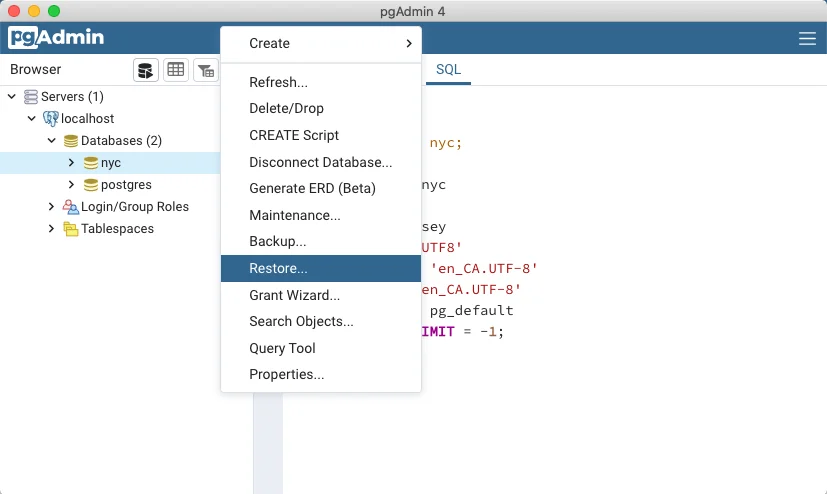
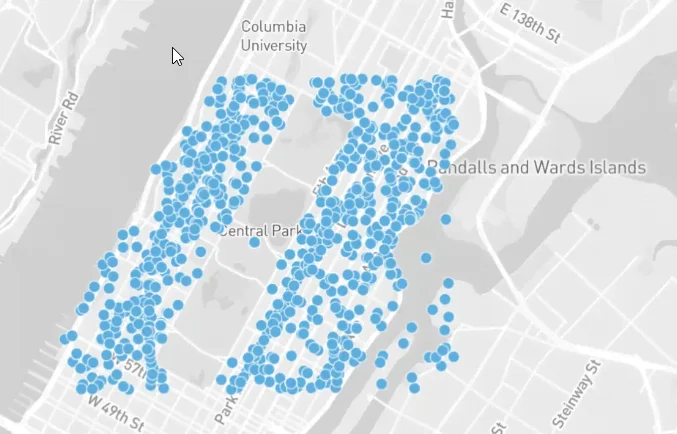
Next, right-click on the database name again and select "Refresh." You should now see a list of new tables and data. PGAdmin has a handy Geometry Viewer, which you can click to see the layout of the streets.
Run Complex Queries
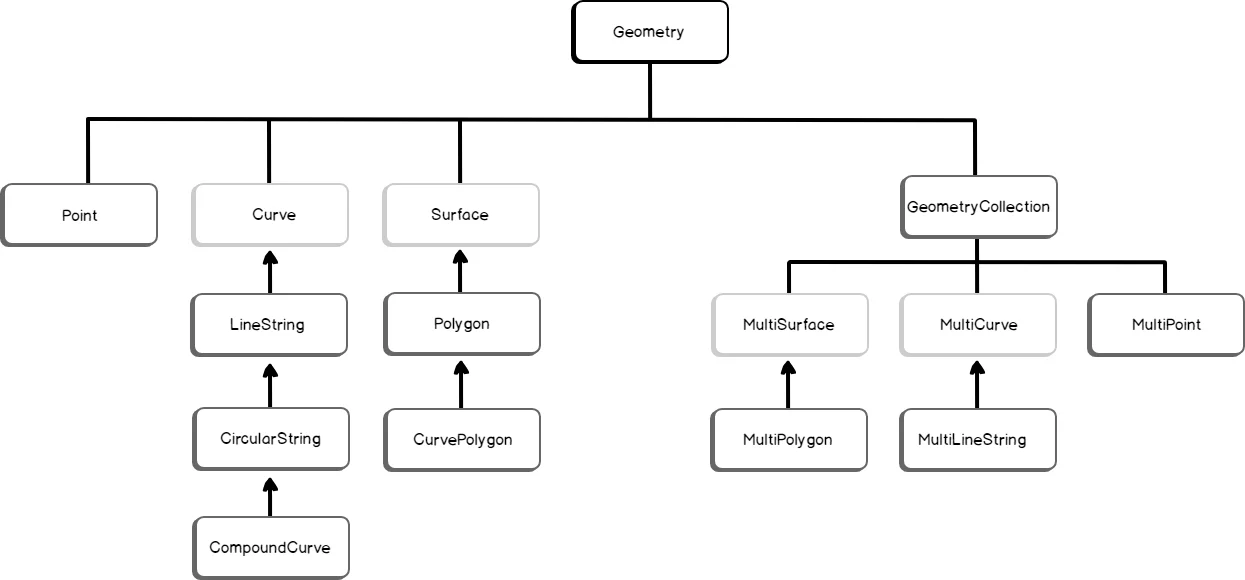
When a database instance runs the Postgis extension, created databases will include the geometry data type, and will be geospatially aware. The geometry column is an opaque binary that requires Postgis functions to turn the data that gets stored there into usable points.
Query a Single Point
To get a single set of latitude and longitude coordinates from the geom column, run the following query:
SELECT name, ST_AsText(geom)
  FROM nyc_subway_stations
  LIMIT 5;
The result should look something like this
"Cortlandt St"	"POINT(583521.854408956 4507077.862599085)"
"Rector St"	"POINT(583324.4866324601 4506805.373160211)"
"South Ferry"	"POINT(583304.1823994748 4506069.654048115)"
"138th St"	"POINT(590250.10594797 4518558.019924332)"
"149th St"	"POINT(590454.7399891173 4519145.719617855)"
The ST_AsText function turns the opaque binary geom column into a pair of latitude and longitude points.
Finding Distance
Finding simple distances can be done by returning the length of a linestring. A linestring is a path between two points. It is represented as an ordered series of two or more points. Roads and rivers are considered linestrings.
In our sample data, we have linestring data for the streets in New York City. The distances of streets can be found by using the ST_Length function and passing it the name of a linestring (street.) For example:
SELECT ST_Length(geom)
  FROM nyc_streets
  WHERE name = 'Columbus Cir';
Geometry vs Geography
Let's quickly talk about the difference between geometry and geography, particularly as it applies to geospatial data analysis. Postgis draws the distinction between geometry and geography thus: geometry is flat, while geography is curved.
Small distances on the Earth (i.e. between two points in a city) can be easily calculated using cartesian geography. Longer distances, however, (for example, points in different cities or states) must include additional calculations to account for the curvature of the Earth.
Postgis provides this functionality through the geography type. This type should be used instead of the geometry type when calculating distances between countries or cities.
SELECT ST_Distance(
  'SRID=4326;POINT(-118.4079 33.9434)'::geography, -- Los Angeles (LAX)
  'SRID=4326;POINT(2.5559 49.0083)'::geography     -- Paris (CDG)
  );
Spatial Indexes
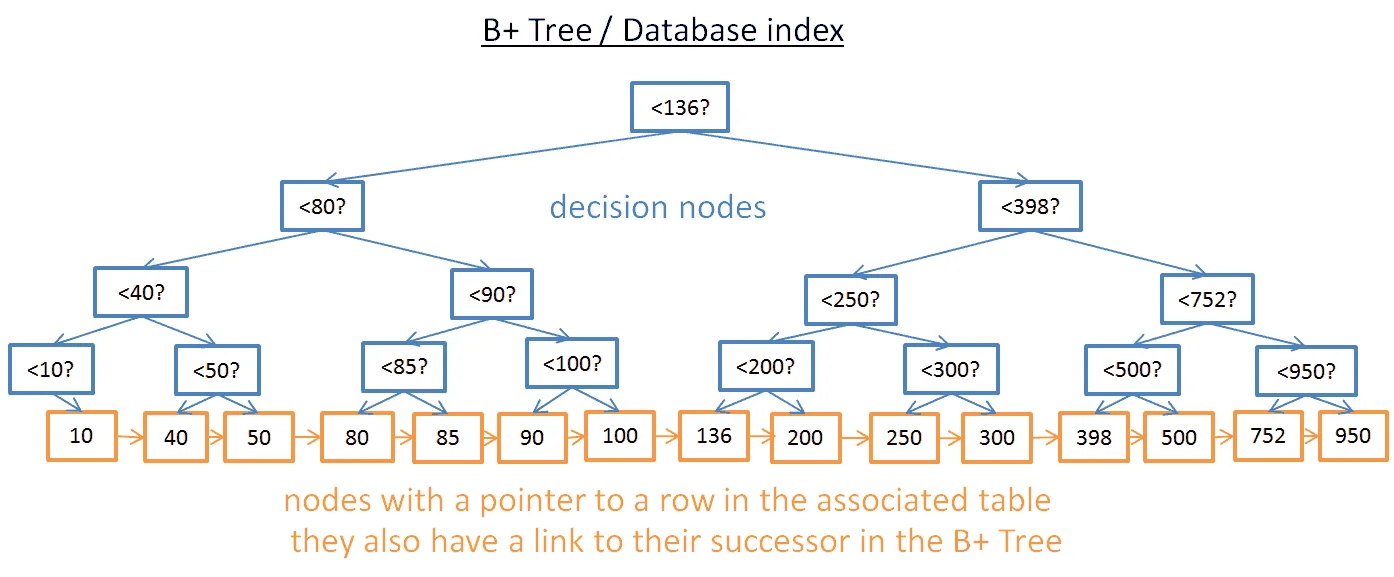
Spatial indexes, like regular database indexes, make querying spatial data faster and working with very large datasets more manageable. Without a spatial index, searches would require a "sequential scan" of all rows in the table. An index organizes the data into a search tree for faster processing.
To test this, let's remove the spatial index from nyc_census_blocks.
DROP INDEX nyc_census_blocks_geom_idx;
Then run the following query in PGAdmin and watch the "timing" indicator.
SELECT count(blocks.blkid)
 FROM nyc_census_blocks blocks
 JOIN nyc_subway_stations subways
 ON ST_Contains(blocks.geom, subways.geom)
 WHERE subways.name LIKE 'B%';
Now, the table is small, so granted, the time it takes to scan it should be quite small (around 300ms.) But let's see what happens when we add the index back again.
CREATE INDEX nyc_census_blocks_geom_idx
  ON nyc_census_blocks
  USING GIST (geom);
When you run the same query, the PGAdmin timing indicator should show a significantly faster processing time (somewhere around 50ms.)
Conclusion
In this article, we looked at how to set up a Postgresql database with Postgis and work with the geometry data type. We loaded some test data provided by the Postgis docs and used the special Postgis functions to query for geospatial data. We also used the Geography Viewer to view all the points on a map.
FAQs
Does Postgres support geospatial data?
Yes. While Postgres does not have built-in support for geolocation, there are several Postgres extensions including Postgis that allow you to treat geospatial data as first-class objects in your database.
What is the data type for latitude and longitude in Postgresql?
In Postgresql, latitude and longitude are represented by the POINT data type. This is a geometry data type that is stored in the opaque binary geom column. It can be accessed by running the Postgis ST_AsText function.
Is Postgis included in Postgresql?
No, Postgis is an add-on, or extension. It is a spatial database extender that adds support for geographic objects and allows geospatial queries to be run in a Postgres database.
Frequently Asked Questions
What is PostGIS and why do you need it for geolocation in PostgreSQL?
PostGIS is an extension that adds geographic object support to PostgreSQL, enabling you to store and query spatial data like coordinates, paths, and regions. Without it, PostgreSQL has no built-in way to handle geospatial queries such as proximity searches or distance calculations. You install it once with CREATE EXTENSION postgis and it unlocks spatial data types, indexing, and functions.
What is the difference between geometry and geography data types in PostGIS?
Geometry treats the Earth as a flat plane, which works well for local or small-area calculations. Geography accounts for the Earth's curvature, making it more accurate for distances across cities or countries. Use geometry when working with localized data and geography when precision matters over large distances.
How do you calculate the distance between two points in PostgreSQL using PostGIS?
Use the ST_Distance() function, passing two geometry or geography values representing your coordinates. For readable output of stored coordinates, use ST_AsText() to convert from PostGIS's binary format. Pairing these functions with a spatial index (GIST) keeps queries fast even on large datasets.
What are spatial indexes and why do they matter for geolocation queries in Postgres?
Spatial indexes (GIST indexes in PostGIS) organize geographic data into a search tree so the database can quickly narrow down candidates instead of scanning every row. Without a spatial index, queries like "find all locations within 10 km" get much slower as your dataset grows. You create one the same way as a regular index, just specifying the USING GIST option.
How do you store IP address geolocation data in PostgreSQL for fast lookups?
A common approach is to load a dataset like MaxMind GeoLite2 into Postgres tables and use the ip4r extension for efficient IP range indexing. The ip4r extension adds IP address range types and indexes that reduce lookup time from seconds to milliseconds. For one-off or real-time lookups, calling an external IP geolocation API and caching the result in a Postgres column is often simpler.
When should you use a PostGIS database versus an IP geolocation API?
PostGIS is the right choice when you need to join geolocation data with other tables, run spatial queries at scale, or avoid repeated external API requests (for example, bulk-geolocating millions of stored records). An IP geolocation API is better for real-time, per-request lookups where you do not want to maintain a local database or manage monthly data updates. Many applications use both: an API at the edge for live traffic and a Postgres store for historical analysis.
