


The HTTP Status Code 408 means that the server timed out waiting for the request from the client.
Your Guide to the 408 Request Timeout Error
A 408 Request Timeout error means the server didn't receive a complete request from the client within the expected time frame. In other words, the client took too long to send data, and the server gave up waiting.
Even though the 4xx status codes are classified as client errors, a 408 can be influenced by server-side factors. This can mix things up, as developers and admins may assume the issue lies solely with the client or solely with the server, leading to incomplete troubleshooting.
In this guide, we'll go over what a 408 request timeout is, exploring its common causes, from slow networks to server settings, and provide actionable steps to solve it.
Decoding the 408 Status Code
A 408 request timeout error is issued when your connection with a server "times out" because your request, or your network path, is too slow or silent. Sometimes, this can also happen when the server's timeout has been misconfigured, or it's too busy to address the request.
Think of a 408 request timeout like an awkward phone call. You dial a restaurant to place an order, someone picks up, but you freeze and say nothing. After a few seconds of silence, the person on the other end hangs up so they can answer other calls.
HTTP status code 408 works in a similar way. The client begins to make an API request, but fails to complete it quickly enough. Once the server's timeout threshold is reached, it closes the connection to free up resources.
So, a 408 doesn't mean the server is down, but that the connection attempt expires because the client (or the network path between client and server) was too slow or unresponsive.
The Most Common Causes of a 408 Timeout
408 request timeout errors can be due to various reasons, such as a slow internet connection, overly complex requests, or even a misconfiguration in the server's timeout settings. Let's break down briefly some of the most common causes for this:
- Network latency. The most common cause of the 408 status code. It happens when the user has a slow internet connection, or there's a bottleneck between the client and the server that slows down the requests.
- Large client requests. If the client tries to upload a very large file or construct a complex request that takes too long to transmit, it may prompt a 408 error.
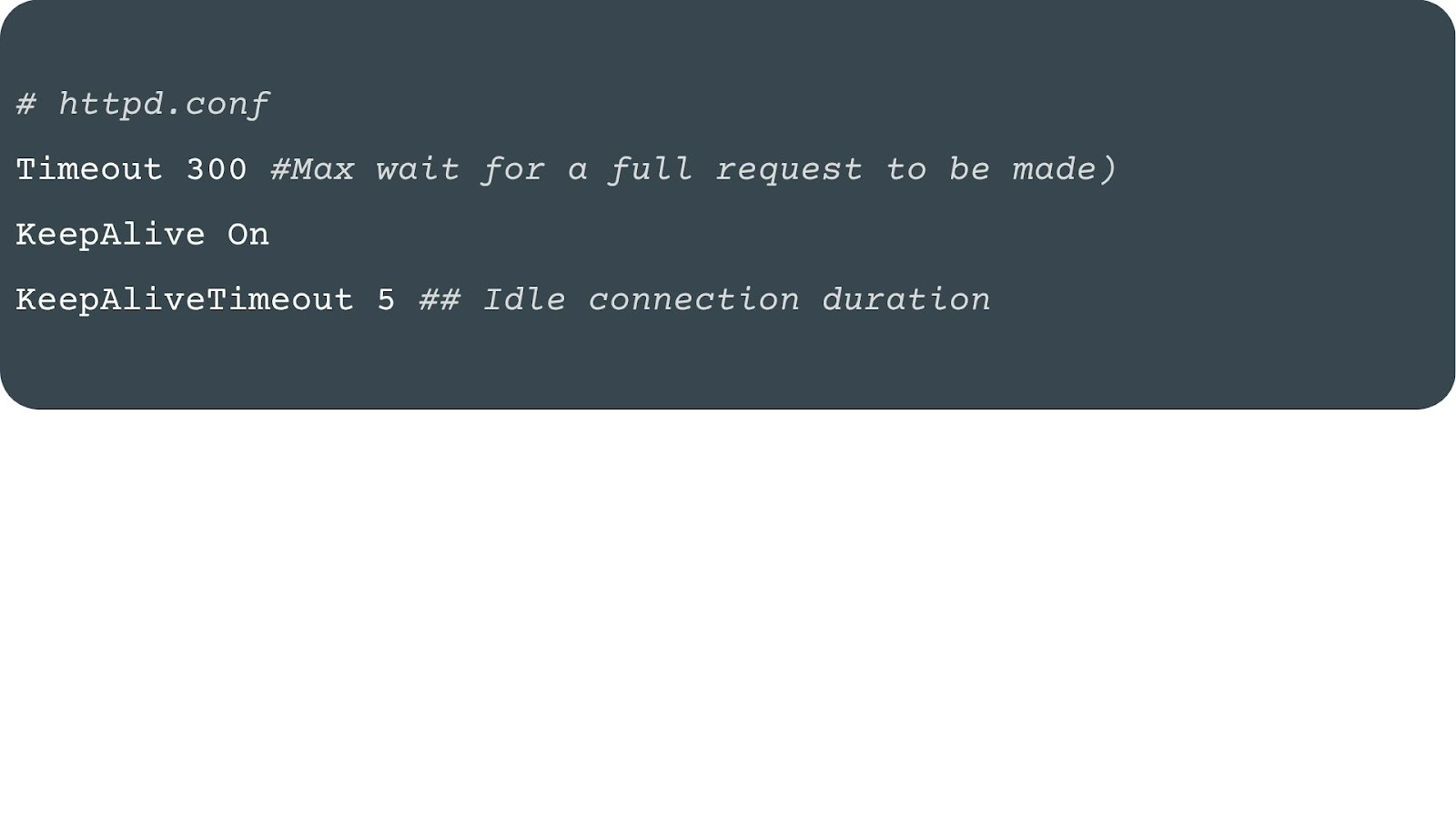
- Server's timeout. If the client holds a connection open but doesn't send another request before the server's KeepAliveTimeout expires, it leads to a timeout error. This can also happen if the server has been set with an extremely short timeout period.
- Browser connection. Modern browsers sometimes open TCP connections to websites you might visit. If you don't end up visiting, the server will eventually time out and close that unused connection, which can be logged as a 408.
How to Troubleshoot and Fix a 408 Error
There are different ways to troubleshoot a 408 timeout error, depending on which side of the server you are located on.
Are you a website or app user facing a 408 HTTP status code? Then, proceed as follows:
- Refresh the page. Refresh the page and retry the request with F5 or Cmd+R. Many 408 errors resolve with a simple retry, since the timeout may have been caused by a temporary network blip.
- Check your internet connection. Unstable or slow connections often trigger a 408 status code. To see if your network speed is causing the error, run a speed or stability test.
- Retry the request. For large uploads, reissuing the command may solve the problem if you were trying to upload a file and didn't succeed because of an unstable connection.
Are you a server administrator or developer? Then, some of the best, most simple practices for troubleshooting a 408 status code include:
- Adjust server timeout directives. If requests are dropping because clients or their networks are too slow, or if the server is heavily loaded or at risk of resource exhaustion, changing its timeout threshold may help to solve the 408 error.
- If you're using Apache, open httpd.conf or .htaccess, and adjust the directives Timeout and KeepAliveTimeout.
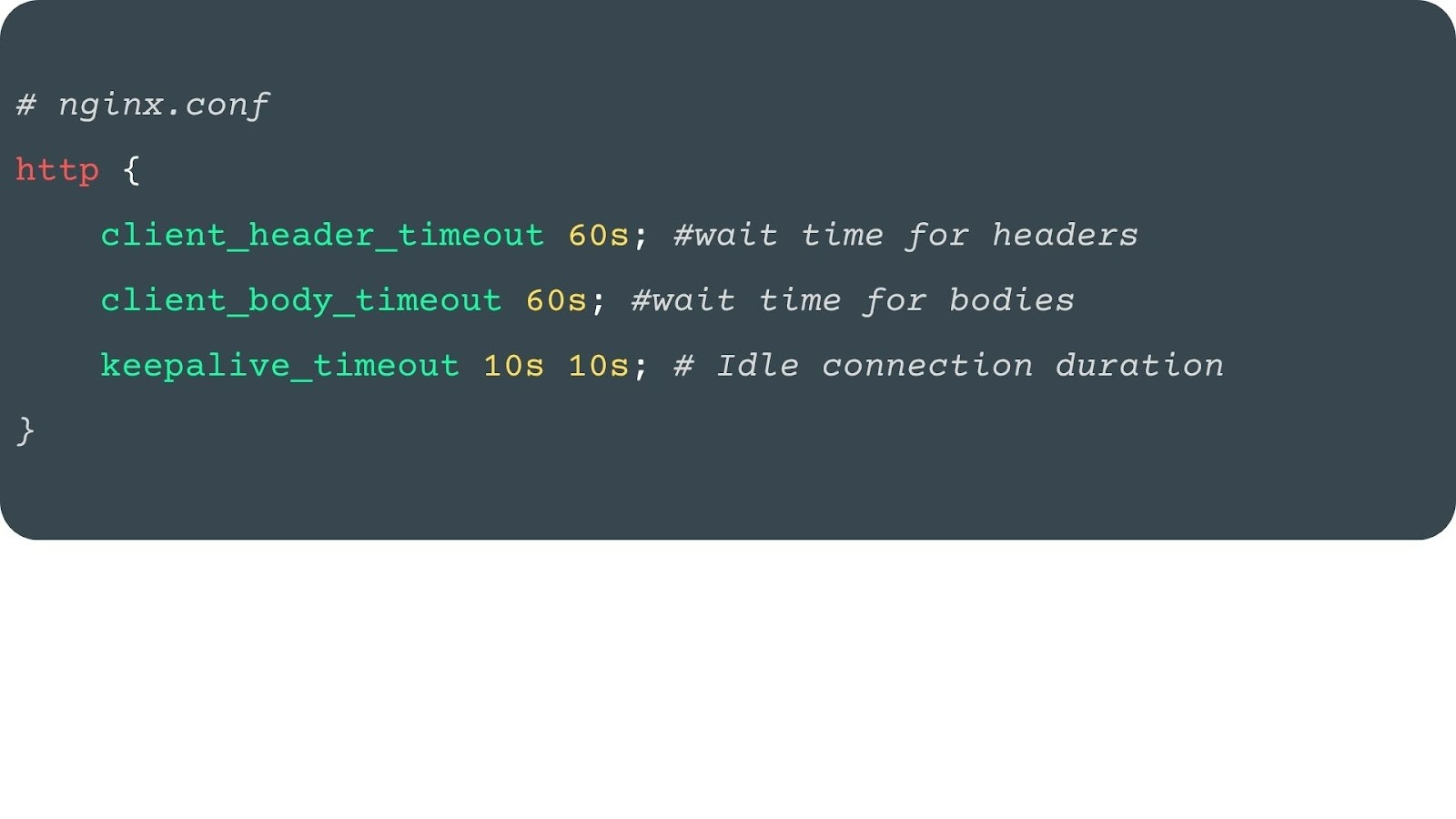
- If you're using Nginx, edit nginx.conf inside the http {} block:
- Check load balancer timeouts. If using AWS ELB, F5, or another load balancer, ensure its idle timeout is equal to or greater than your server's. Otherwise, it may drop requests prematurely, causing he 408 request timeout error.
- Monitor network performance. Use tools like ping, traceroute, or mtr to check for packet loss or high latency between your server and your users. Network instability is a common cause of 408 errors.
The Critical Difference: 408 vs. 504 Gateway Timeout
The 408 Request Timeout is often confused with the 504 Gateway Timeout. The main difference comes down to when the timeout occurs:
- A 408 error happens when the client takes too long to send its request. The server waits, but when the timeout threshold is reached, it closes the connection.
- A 504 error happens later in the process. The client's request was already sent, but the server (acting as a gateway or proxy) is waiting on another server upstream. If that server doesn't respond in time, the 504 gateway timeout is triggered.
It's pretty much like being in a restaurant. With a 408, you never finish telling the waiter your order, so they move on. However, with a 504, you placed your order, but the kitchen takes too long to deliver it.
| Status Code | What Happened |
|---|---|
| 408 Request Timeout | The server timed out waiting for the client's request to arrive. |
| 504 Gateway Timeout | The server (acting as a gateway) timed out waiting for a response from an upstream server. |
Conclusion: From Timeout to Throughput
A 408 request timeout means the server waited for the client to finish sending a request, but gave up when the delay was too long. For end users, the fix is often as simple as checking the internet connection or retrying the request. For administrators, it usually comes down to tuning timeout directives or checking for network bottlenecks.
On the other hand, while 408 signals a timeout between client and server, 504s indicates a timeout between servers. Understanding the difference helps you pinpoint if the slowdown is happening at the edge, on the client side, or deeper in your infrastructure, allowing you to quickly fix the issues causing the HTTP status code.
Now that you understand what a 408 Request Timeout is, you're one step closer to mastering debugging. Check out our guides to HTTP Status Codes and start handling client-server communication like a pro.
Great projects run on great APIs. Ready to bring yours to the next level? Build smarter with Abstract API, made by developers, for developers.
Frequently Asked Questions
What does HTTP 408 mean?
HTTP 408 Request Timeout means the server timed out waiting for the client to finish sending its request. Rather than keep the connection open indefinitely, the server closes it and returns a 408. It is classified as a 4xx client error, though server-side configuration can also contribute to it.
When does a server return a 408?
A server returns a 408 when the client does not complete its request within the server's configured timeout window. Common triggers include slow network connections, large file uploads that take too long to transmit, and idle TCP connections that browsers open speculatively but never use.
How do I fix an HTTP 408 error?
For end users, refreshing the page, checking internet stability, and retrying the request usually resolves the issue. For administrators, the fix involves adjusting server timeout directives — such as Timeout and KeepAliveTimeout in Apache's httpd.conf, or keepalive_timeout and client_body_timeout in Nginx's nginx.conf — and ensuring load balancer timeouts are aligned with server settings.
What is the difference between a 408 and a 504 error?
A 408 occurs when the client is too slow delivering its request to the server. A 504 Gateway Timeout occurs when the server is waiting on a response from an upstream server and that upstream takes too long. In short: 408 is the client's delay, 504 is a backend delay.
Is a 408 the client's fault or the server's fault?
Although 408 sits in the 4xx client-error range, it is not always the client's fault. A server configured with an unusually short timeout period can produce 408 errors even when the client is behaving normally. Troubleshooting should check both network conditions on the client side and timeout settings on the server side.
Should my application automatically retry a 408 request?
Yes. A 408 is considered a transient error, meaning the underlying condition is likely temporary. Programmatic clients should implement retry logic, ideally with exponential backoff, to resend the request after a short delay. If the server returns a Retry-After header, use that value to determine how long to wait before retrying.
