


🌍 The “One Format to Rule Them All”: The E.164 Standard
What Is E.164?
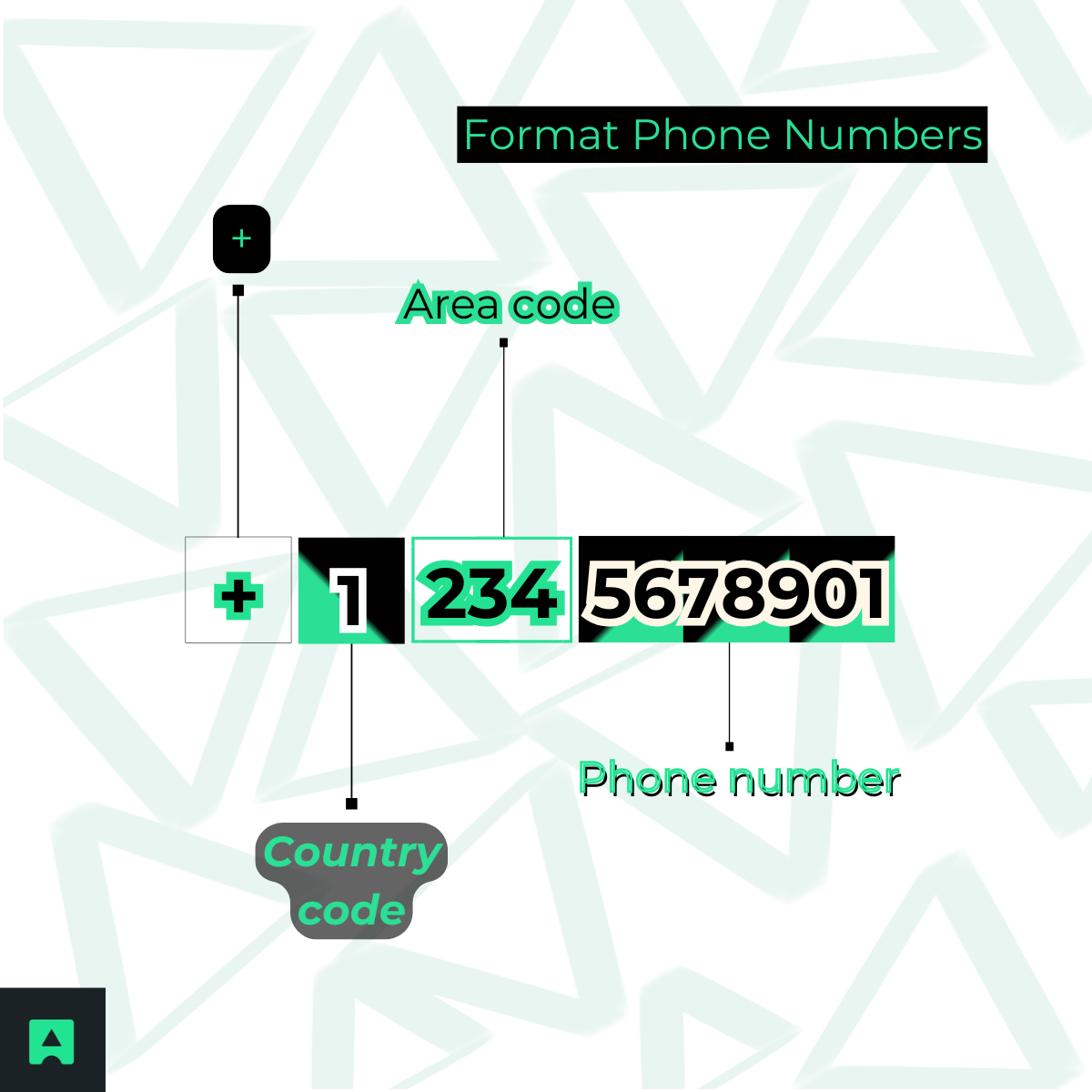
E.164 is the international standard for phone number formatting — and it’s the format every modern application should use for storing numbers.
Structure:
+ [Country Code] [Subscriber Number]
Rules:
- Begins with a “+” sign
- Contains only digits (no spaces, dashes, or parentheses)
- Has a maximum of 15 digits
✅ Example: +15551234567
Why Your Database Must Use E.164
Using E.164 in your backend isn’t just a best practice — it’s essential.
- Database Consistency: You’ll store all numbers in a uniform format:
- US → +15551234567
- UK → +442071234567
- API Compatibility: SMS, voice, and validation services like Twilio and AbstractAPI expect E.164.
- International Readiness: Once you store numbers this way, your app becomes instantly global-ready 🌐.
Formatting for Readability: National vs. International Display
While E.164 is perfect for databases, it’s not ideal for your users. For UI and UX, readability matters. Let’s look at how to format for display.
🇺🇸 US National Format (NANP)
In the North American Numbering Plan (NANP), the structure is:
NPA-NXX-XXXX (Area Code – Exchange – Line Number).
Common readable variations include:
- (555) 123-4567 ✅
- 555-123-4567
- 555.123.4567
These are familiar to US users and make forms, invoices, and contact lists more user-friendly.
🌐 International Display Format
When showing numbers for global audiences, clarity is key.
Use the international display format, starting with +, followed by the country code and the grouped number.
- 🇺🇸 US: +1 (555) 123-4567
- 🇬🇧 UK: +44 20 7123 4567
This keeps your app accessible to international users while preserving local readability.
💻 How to Programmatically Format Phone Numbers
Now for the hands-on part! Let’s look at how to format phone numbers in code.
⚡ Method 1: The Quick Regex Check (E.164 Validation)
If you just need to check whether a number looks like it’s in E.164 format, Regex is your simplest tool.
// Checks for a + sign, followed by 11 to 15 digits
const e164Regex = /^\+[1-9]\d{10,14}$/;
console.log(e164Regex.test('+15551234567')); // ✅ true
console.log(e164Regex.test('+442071234567')); // ✅ true
console.log(e164Regex.test('5551234567')); // ❌ false
console.log(e164Regex.test('+1 (555) 123-4567')); // ❌ false
⚠️ Limitation: This approach only checks the format — it won’t convert a messy input like (555) 123-4567 into E.164.
🧠 Method 2: The Smart Way — Using libphonenumber-js
The libphonenumber-js library (a JavaScript port of Google’s libphonenumber) handles the heavy lifting for you. It parses, formats, and normalizes phone numbers across all countries.
Install the Library: npm install libphonenumber-js
Parse and Format:
import { parsePhoneNumber } from 'libphonenumber-js';
const messyNumber = '(555) 123-4567';
const country = 'US'; // Required default country
const phoneNumber = parsePhoneNumber(messyNumber, country);
if (phoneNumber) {
// 1. Format for Database (E.164)
console.log(phoneNumber.format('E.164'));
// +15551234567
// 2. Format for UI (National)
console.log(phoneNumber.format('NATIONAL'));
// (555) 123-4567
// 3. Format for International Display
console.log(phoneNumber.format('INTERNATIONAL'));
// +1 555 123 4567
}
✨ With just a few lines, you get every format your app needs — human and machine-readable.
🚨 The “Gotcha”: A Formatted Number Isn’t Always Valid
Here’s the trap many developers fall into: once your code can parse and format phone numbers — especially using tools like libphonenumber-js — it feels like the job is done. But formatting only solves the cosmetic problem.
Let’s consider this example:
libphonenumber-js will happily convert the demo number (800) 555-0199 into the perfect E.164 version: ➡️ +18005550199
Looks flawless, right?
Unfortunately… it’s not an active or real number. And your code can’t tell the difference. 😬
Why This Is a Problem 🚧
Formatting libraries and Regex patterns cannot determine critical real-world attributes such as:
❌ Whether the number is actually in service
❌ Whether it’s Mobile, Landline, Toll-Free, or VoIP
❌ Whether the carrier is risky, fraudulent, or temporary (common in SMS abuse)
The Consequence 🤦♂️
You end up storing a perfectly formatted but completely fake number in your database.
That leads to:
- Failed SMS notifications
- Fake or disposable user sign-ups
- Corrupted datasets
- Wasted API or marketing spend
This is why formatting ≠ validation — and why you need a fully intelligent solution that can format AND verify at the same time.
⚙️ The One-Step Solution: Format and Validate with AbstractAPI
When accuracy matters, you need more than formatting. You need validation, enrichment, type detection, and carrier lookup — all in one step.
How to Format and Validate with AbstractAPI
That’s exactly what the AbstractAPI Phone Validation API provides.
Instead of juggling Regex patterns and libraries, you send any messy input (national or international), and the API returns:
- A properly formatted E.164 number
- Human-friendly formats (national & international)
- Line type (mobile, landline, VoIP, toll-free)
- Carrier information
- Country and location
- A boolean valid flag confirming if the number is real
One request → complete phone intelligence. ⚡📞
🔧 How to Format and Validate With AbstractAPI
Here’s a real example using fetch in JavaScript:
const API_KEY = 'YOUR_ABSTRACTAPI_KEY';
const messyNumber = '(555) 123-4567';
async function validateAndFormat() {
try {
const response = await fetch(
`https://phonevalidation.abstractapi.com/v1/?api_key=${API_KEY}&phone=${messyNumber}`
);
const data = await response.json();
console.log(data);
} catch (error) {
console.error(error);
}
}
validateAndFormat();
📦 Example JSON Response
{
"phone": "+15551234567",
"valid": true,
"format": {
"e164": "+15551234567",
"international": "+1 555-123-4567",
"national": "(555) 123-4567"
},
"country": {
"code": "US",
"name": "United States"
},
"location": "California",
"type": "mobile",
"carrier": "T-Mobile USA, Inc."
}
💡 Why This Matters
With a single API call, you instantly receive:
- format.e164 → ideal for storing in your database
- format.national → perfect for UI display
- valid: true → confirmation that the number actually exists
- type: "mobile" → essential for SMS delivery success and fraud prevention
This removes guesswork, eliminates data errors, and ensures your system communicates using real, deliverable phone numbers.
🧩 Conclusion: Stop Just Formatting — Start Validating
Formatting phone numbers correctly is essential — but it’s only half the battle.
- ✅ Use E.164 for storage.
- ✅ Use libphonenumber-js for readable UI display.
- 🚀 Use AbstractAPI’s Phone Validation API to ensure your numbers are real, valid, and ready for global communication.
Clean, validated data = reliable applications.
Get your free API key and start validating today! 🔑

❓ Frequently Asked Questions
What is the standard US phone number format?
For databases: use E.164 (+15551234567).
For display: (555) 123-4567.
What is E.164 phone number format?
E.164 starts with a +, followed by the country code and subscriber number — no spaces or punctuation, max 15 digits.
How do I format a phone number in JavaScript?
Use libphonenumber-js:
parsePhoneNumber(number, country).format('NATIONAL') or .format('E.164').
What is the regex for E.164 format?
Use: ^\+[1-9]\d{10,14}$
But remember — regex checks structure only. To verify a number’s validity, use the Phone Validation API.
